> ## Documentation Index
> Fetch the complete documentation index at: https://docs.quinnsambal.com/llms.txt
> Use this file to discover all available pages before exploring further.
# Barcode
***
title: "Barcode System"
description: "Generate, scan, dan print barcode 1D/2D dengan dukungan hardware scanner, mobile camera, dan batch processing."
-----------------------------------------------------------------------------------------------------------------------------
# Barcode System
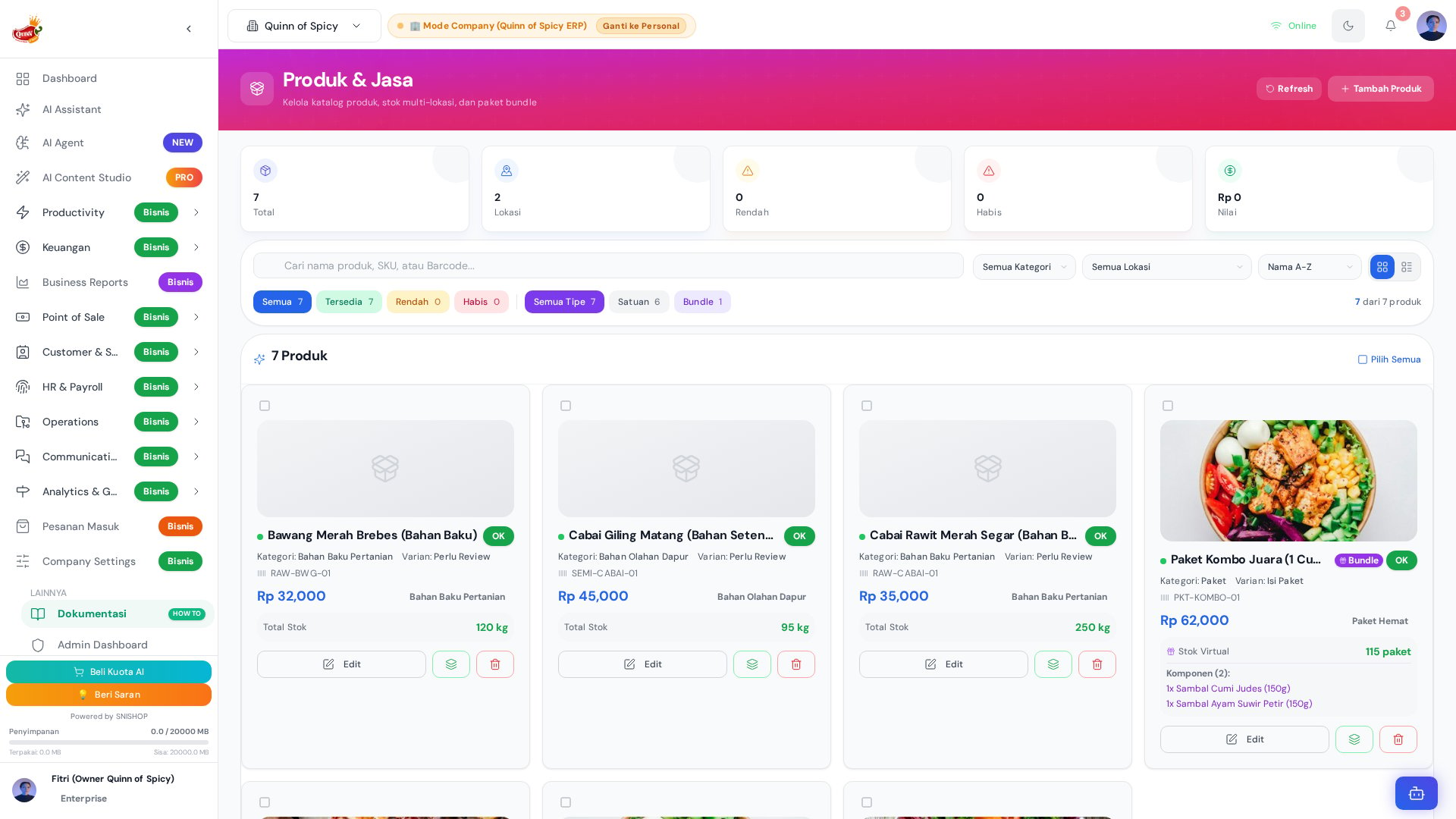 Sistem barcode Quinn of Spicy mendukung seluruh siklus operasional barcode — dari generate otomatis berdasarkan SKU, print label dalam jumlah besar, hingga scan untuk stock operation dan transaksi POS. Sistem mendukung barcode 1D (Code 128, EAN-13, UPC-A) dan 2D (QR Code, DataMatrix), dengan kompatibilitas hardware scanner USB/Bluetooth/wireless maupun kamera mobile.
## Arsitektur Barcode System
```mermaid theme={null}
graph TB
subgraph "Generate"
SKU[SKU-Based
Sistem barcode Quinn of Spicy mendukung seluruh siklus operasional barcode — dari generate otomatis berdasarkan SKU, print label dalam jumlah besar, hingga scan untuk stock operation dan transaksi POS. Sistem mendukung barcode 1D (Code 128, EAN-13, UPC-A) dan 2D (QR Code, DataMatrix), dengan kompatibilitas hardware scanner USB/Bluetooth/wireless maupun kamera mobile.
## Arsitektur Barcode System
```mermaid theme={null}
graph TB
subgraph "Generate"
SKU[SKU-Based
QOS-{kategori}-{seq}]
CST[Custom Barcode
Input manual]
BAT[Batch Generate
Multi produk]
end
subgraph "Print"
SGL[Single Label
Satu produk]
BTCH[Batch Print
Multi produk]
CFG[Label Config
Size, content, qty]
end
subgraph "Scan"
HW[Hardware Scanner
USB/Bluetooth/Wireless]
MC[Mobile Camera
Kamera HP]
POS[POS Integration
Scan di kasir]
SO[Stock Opname
Scan saat hitung]
ST[Stock Transfer
Scan untuk operasi]
end
subgraph "Validasi"
DUP[Duplicate Check
Cek barcode duplikat]
FMT[Format Validation
Cek format & checksum]
end
SKU & CST & BAT --> SGL & BTCH
CFG --> BTCH
HW & MC --> POS & SO & ST
DUP & FMT --> SKU & CST
```
## Format Barcode
### SKU-Based Barcode (Default)
Setiap produk otomatis mendapat barcode berdasarkan SKU:
| Komponen | Format | Contoh |
| - | - | - |
| **Prefix** | QOS | QOS |
| **Kategori** | 3 huruf kode | SMB (Sambal), KRP (Keripik) |
| **Sequence** | 3 digit angka | 001, 002, 003 |
| **Full Format** | QOS-{KAT}-{SEQ} | QOS-SMB-001 |
### Custom Barcode
Jika tidak ingin menggunakan format default:
1. Buka detail produk
2. Klik **Set Custom Barcode**
3. Input kode custom (maks 20 karakter)
4. Sistem cek duplikat
5. Generate barcode image
### Barcode per Variant
Setiap variant produk bisa memiliki barcode riêng:
| Produk | Variant | SKU | Barcode |
| - | - | - | - |
| Ayam Suwir Petir | 150g | QOS-ASP-150 | QOS-ASP-150 |
| Ayam Suwir Petir | 300g | QOS-ASP-300 | QOS-ASP-300 |
| Ayam Suwir Petir | 500g | QOS-ASP-500 | QOS-ASP-500 |
| Sambal Matah | 100ml | QOS-SMB-100 | QOS-SMB-100 |
| Sambal Matah | 250ml | QOS-SMB-250 | QOS-SMB-250 |
## Jenis Barcode yang Didukung
### 1D Barcode
| Tipe | Karakter | Panjang | Penggunaan |
| - | - | - | - |
| **Code 128** | ASCII lengkap | Variabel | Default untuk produk (SKU-based) |
| **Code 39** | A-Z, 0-9, beberapa simbol | Variabel | Alternatif jika perlu alfanumerik |
| **EAN-13** | 13 digit angka | 13 | Standar retail internasional |
| **UPC-A** | 12 digit angka | 12 | Standar retail Amerika Utara |
### 2D Barcode
| Tipe | Kapasitas | Penggunaan |
| - | - | - |
| **QR Code** | 4.296 karakter alfanumerik | Link ke detail produk, URL, info lengkap |
| **DataMatrix** | 2.335 karakter | Label kecil, encoding padat |
| **PDF417** | 1.108 byte | Dokumen, kartu identitas |
## Print Barcode Label
### Konfigurasi Label
| Parameter | Opsi | Default |
| - | - | - |
| **Ukuran Label** | 30x20mm, 40x30mm, 50x30mm, 70x50mm | 40x30mm |
| **Konten** | Barcode, Nama Produk, Harga, SKU | Barcode + Nama |
| **Quantity** | 1-1000 label | 1 |
| **Orientasi** | Portrait, Landscape | Portrait |
| **Border** | Ya/Tidak | Tidak |
### Single Print
1. Buka halaman produk (`/companyproducts`)
2. Pilih produk
3. Klik **Print Barcode**
4. Pilih quantity label, ukuran, konten
5. Klik **Print**
### Batch Print
1. Buka daftar produk (`/companyproducts`)
2. Pilih beberapa produk (checkbox)
3. Klik **Batch Print Barcode**
4. Konfigurasi label (ukuran, konten, qty per produk)
5. Preview label
6. Klik **Print All**
### Contoh Label
```
┌──────────────────────────────┐
│ ██████ █ █ ██ ████ █ █ │ ← Barcode
│ QOS-SMB-001 │ ← SKU
│ Sambal Matah 100ml │ ← Nama Produk
│ Rp 15.000 │ ← Harga (opsional)
└──────────────────────────────┘
```
## Scan Barcode
### Hardware Scanner
| Tipe | Koneksi | Jarak | Kecepatan | Cocok Untuk |
| - | - | - | - | - |
| **USB Scanner** | Kabel USB | \< 30cm | Instant | Kasir desktop |
| **Bluetooth Scanner** | Bluetooth | \< 10m | \< 1 detik | Gudang, mobile |
| **Wireless Scanner** | RF 2.4GHz | \< 30m | \< 1 detik | Gudang besar |
| **Mobile Scanner** | WiFi/Cellular | Unlimited | 1-2 detik | Lapangan |
### Mobile Camera
Scan barcode via kamera HP:
1. Buka aplikasi Quinn of Spicy di mobile
2. Pilih menu **"Scan Barcode"**
3. Arahkan kamera ke barcode
4. Auto-detect dan identifikasi produk
5. Pilih aksi: lihat detail, stock in/out, atau tambah ke cart
### Penggunaan di Berbagai Skenario
| Skenario | Cara Scan | Aksi Setelah Scan |
| - | - | - |
| **POS Transaction** | Scan di kasir | Produk masuk cart otomatis |
| **Stock In** | Scan di gudang | Form stock in terbuka, produk terisi |
| **Stock Out** | Scan di gudang | Form stock out terbuka |
| **Stock Opname** | Scan saat hitung fisik | Input qty fisik untuk produk tersebut |
| **Stock Transfer** | Scan produk | Form transfer terbuka |
| **Product Lookup** | Scan di mana saja | Detail produk ditampilkan |
## Validasi Barcode
### Duplicate Check
```mermaid theme={null}
flowchart LR
A[Input Barcode] --> B{Barcode Sudah Ada?}
B -->|Ya| C[⚠️ Warning: Duplikat]
C --> D[Suggest Alternative]
B -->|Tidak| E[✅ Barcode Valid]
E --> F[Simpan ke Produk]
```
### Format Validation
| Check | Deskripsi | Error jika Gagal |
| - | - | - |
| **Length** | Panjang barcode sesuai tipe | "Barcode terlalu pendek/panjang" |
| **Characters** | Karakter valid untuk tipe yang dipilih | "Karakter tidak valid" |
| **Checksum** | Checksum digit terakhir (EAN/UPC) | "Checksum tidak valid" |
| **Uniqueness** | Tidak ada barcode sama di sistem | "Barcode sudah digunakan" |
## Reporting
### Barcode Usage Report
| Metrik | Deskripsi |
| - | - |
| **Total Generated** | Jumlah barcode yang sudah di-generate |
| **Total Scanned** | Jumlah scan per hari/minggu/bulan |
| **Scan Success Rate** | % scan berhasil vs gagal |
| **Top Scanned Products** | 10 produk yang paling sering discan |
| **Scan by Location** | Distribusi scan per lokasi |
### Barcode Error Report
| Metrik | Deskripsi |
| - | - |
| **Failed Scans** | Jumlah scan yang gagal |
| **Invalid Barcodes** | Barcode yang tidak valid terdeteksi |
| **Duplicate Barcodes** | Barcode duplikat yang ditemukan |
| **Resolution** | Tindakan yang sudah diambil |
## Best Practices
### Label Placement
| Aturan | Alasan |
| - | - |
| Tempel di tempat yang mudah discan | Mempercepat operasional |
| Hindari lipatan atau kerutan | Barcode rusak = gagal scan |
| Gunakan label tahan air/minyak | Lingkungan F\&B rentan kotoran |
| Replace label yang rusak | Cegah gagal scan |
| Konsisten di posisi yang sama | Staff terbiasa, lebih cepat |
### Scanner Maintenance
| Tugas | Frekuensi | Detail |
| - | - | - |
| **Clean lens** | Mingguan | Lap lensa dengan kain lembut |
| **Check battery** | Harian (wireless) | Isi ulang sebelum shift |
| **Test scanner** | Tiap awal shift | Test scan 1 produk |
| **Backup scanner** | Selalu punya cadangan | Min. 1 backup per lokasi |
### Barcode Quality
| Aspek | Standar |
| - | - |
| **Resolusi print** | Min. 300 DPI |
| **Kontras** | Hitam di putih (paling reliable) |
| **Ukuran min.** | Lebar 20mm, tinggi 15mm |
| **Quiet zone** | 5mm margin di kiri-kanan barcode |
| **Test scan** | Test setiap batch print |
***
## Entity Schema & Diagram
### ER Diagram — Barcode & Serial Number
```mermaid theme={null}
erDiagram
CompanyPOSProduct ||--o{ SerialNumber : "memiliki"
CompanyPOSProduct ||--o{ CompanyPOSInventory : "dicatat"
SerialNumber }o--|| WarehouseLocation : "disimpan di"
SerialNumber }o--o| CompanyPOSTransaction : "terjual melalui"
CompanyPOSProduct {
string company_id PK
string name "Nama produk"
string sku "SKU produk"
string barcode "Barcode / QR Code (EAN-13)"
string product_type "finished_good | raw_material | semi_finished | packaging_material | bundle"
string packaging_type "Jenis kemasan"
number net_weight_grams "Berat bersih (gram)"
number gross_weight_grams "Berat kotor (gram)"
string storage_condition "room_temperature | chilled | frozen"
number price "Harga jual"
number stock "Stok saat ini"
boolean is_active "Status aktif"
}
SerialNumber {
string company_id FK
string serial_number PK "Serial number unik"
string product_id FK "Relasi ke produk"
string product_name "Nama produk (denormalized)"
string lot_id "ID lot/batch"
date manufacture_date "Tanggal produksi"
date warranty_expiry "Masa garansi berakhir"
string status "in_stock | sold | warranty_claim | scrapped"
string location_id FK "Lokasi gudang"
string location_name "Nama lokasi (denormalized)"
string sold_to_customer_id "Pembeli saat dijual"
datetime sold_date "Tanggal penjualan"
string invoice_id "Referensi invoice"
}
CompanyPOSInventory {
string company_id FK
string product_id FK
string type "in | out | adjustment"
number quantity "Jumlah perubahan stok"
number stock_before "Stok sebelum transaksi"
number stock_after "Stok setelah transaksi"
string reason "Alasan pergerakan"
string reference_id "ID transaksi terkait"
string performed_by "User yang melakukan"
}
```
### Tabel Schema — CompanyPOSProduct (Field Barcode & Fisik)
| Field | Tipe | Wajib | Default | Deskripsi |
| - | - | - | - | - |
| `company_id` | `string` | Ya | — | ID perusahaan pemilik produk |
| `name` | `string` | Ya | — | Nama produk |
| `sku` | `string` | Tidak | — | SKU unik produk |
| `barcode` | `string` | Tidak | — | Barcode / QR Code produk (format EAN-13) |
| `product_type` | `enum` | Tidak | `finished_good` | Tipe produk: `finished_good`, `raw_material`, `semi_finished`, `packaging_material`, `bundle` |
| `packaging_type` | `enum` | Tidak | — | Jenis kemasan: `jar_glass`, `pouch_zipper`, `pouch_sealed`, `toples_plastic`, `bottle_plastic`, `bulk`, `other` |
| `net_weight_grams` | `number` | Tidak | — | Berat bersih isi produk dalam gram |
| `gross_weight_grams` | `number` | Tidak | — | Berat kotor termasuk kemasan dalam gram |
| `storage_condition` | `enum` | Tidak | `room_temperature` | Kondisi penyimpanan: `room_temperature`, `chilled`, `frozen` |
| `price` | `number` | Ya | — | Harga jual produk |
| `cost` | `number` | Tidak | — | Harga modal/beli produk |
| `stock` | `number` | Tidak | `0` | Stok saat ini |
| `min_stock` | `number` | Tidak | `5` | Minimum stok untuk notifikasi alert |
| `unit` | `string` | Tidak | `pcs` | Satuan produk |
| `is_active` | `boolean` | Tidak | `true` | Status produk aktif/nonaktif |
| `is_bundle` | `boolean` | Tidak | `false` | Menandakan paket bundle virtual |
| `is_locked` | `boolean` | Tidak | `false` | Data terkunci karena sudah ada transaksi |
| `sold_count` | `number` | Tidak | `0` | Total jumlah produk terjual |
### Tabel Schema — SerialNumber (Semua Field)
| Field | Tipe | Wajib | Default | Deskripsi |
| - | - | - | - | - |
| `company_id` | `string` | Ya | — | ID perusahaan |
| `serial_number` | `string` | Ya | — | Serial number unik (PK bisnis) |
| `product_id` | `string` | Ya | — | ID produk yang terkait (FK ke CompanyPOSProduct) |
| `product_name` | `string` | Tidak | — | Nama produk (denormalized untuk performa) |
| `lot_id` | `string` | Tidak | — | ID lot/batch produksi |
| `manufacture_date` | `date` | Tidak | — | Tanggal produksi |
| `warranty_expiry` | `date` | Tidak | — | Tanggal kadaluarsa garansi |
| `status` | `enum` | Tidak | `in_stock` | Status siklus hidup: `in_stock`, `sold`, `warranty_claim`, `scrapped` |
| `location_id` | `string` | Tidak | — | ID lokasi gudang penyimpanan |
| `location_name` | `string` | Tidak | — | Nama lokasi (denormalized) |
| `sold_to_customer_id` | `string` | Tidak | — | ID customer yang membeli |
| `sold_date` | `datetime` | Tidak | — | Tanggal dan waktu penjualan |
| `invoice_id` | `string` | Tidak | — | Referensi invoice penjualan |
| `warranty_info` | `object` | Tidak | — | Informasi garansi (nested) |
| `warranty_info.warranty_months` | `number` | — | — | Durasi garansi dalam bulan |
| `warranty_info.warranty_start` | `date` | — | — | Tanggal mulai garansi |
| `warranty_info.warranty_end` | `date` | — | — | Tanggal akhir garansi |
| `warranty_info.covered_by` | `string` | — | — | Pihak yang menanggung garansi |
| `service_history` | `array` | Tidak | — | Riwayat servis (nested) |
| `service_history[].date` | `datetime` | — | — | Tanggal kejadian servis |
| `service_history[].type` | `enum` | — | — | Jenis: `repair`, `maintenance`, `inspection` |
| `service_history[].performed_by` | `string` | — | — | Petugas yang melakukan |
| `service_history[].notes` | `string` | — | — | Catatan servis |
| `service_history[].cost` | `number` | — | — | Biaya servis |
| `notes` | `string` | Tidak | — | Catatan umum |
### State Machine — Siklus Hidup Serial Number
```mermaid theme={null}
stateDiagram-v2
[*] --> in_stock : Generate serial number\nsaat produksi / stock in
in_stock --> sold : Transaksi POS / penjualan\n(sold_date, invoice_id terisi)
in_stock --> scrapped : Rusak / expired\n(catatan: scrapped)
sold --> warranty_claim : Customer mengajukan klaim garansi\n(warranty_info diperbarui)
sold --> [*] : Selesai (arsip)
warranty_claim --> in_stock : Klaim ditolak / barang dikembalikan\nke stok
warranty_claim --> scrapped : Klaim disetujui / barang tidak\nbisa diperbaiki
scrapped --> [*] : Akhir siklus hidup
state in_stock {
[*] --> Tersedia_di_Gudang
Tersedia_di_Gudang : location_id = gudang asal
Tersedia_di_Gudang : status = in_stock
}
state sold {
[*] --> Terjual
Terjual : sold_to_customer_id terisi
Terjual : sold_date & invoice_id terisi
}
state warranty_claim {
[*] --> Proses_Klaim
Proses_Klaim : service_history dicatat
Proses_Klaim : warranty_info divalidasi
}
state scrapped {
[*] --> Dimusnahkan
Dimusnahkan : Tidak bisa dijual lagi
Dimusnahkan : Dicatat untuk audit
}
```
### Sequence Diagram — Barcode Scan → Product Lookup
```mermaid theme={null}
sequenceDiagram
participant User as User / Kasir
participant Scanner as Hardware Scanner / Kamera
participant App as Aplikasi QoS
participant DB as Database
participant Inv as Inventory Service
User->>Scanner: Scan barcode produk
Scanner->>App: Kirim data barcode (EAN-13 / QR)
App->>App: Validasi format barcode (checksum, panjang)
alt Barcode Valid
App->>DB: SELECT * FROM company_pos_products WHERE barcode = ?
DB-->>App: Data produk (name, price, stock, sku)
alt Produk Ditemukan
App-->>User: Tampilkan detail produk
Note over User: Nama, harga, stok, varian
alt Skenario POS
User->>App: Tambah ke keranjang
App->>Inv: Kurangi stok (stock_out)
Inv->>DB: UPDATE stock SET stock = stock - qty
DB-->>Inv: Konfirmasi update
Inv-->>App: Stok berhasil diperbarui
end
alt Skenario Stock Opname
User->>App: Input qty fisik
App->>Inv: Catat adjustment (stock_before → stock_after)
Inv->>DB: INSERT INTO company_pos_inventory (type='adjustment')
DB-->>Inv: Konfirmasi
end
else Produk Tidak Ditemukan
App-->>User: ⚠️ "Barcode tidak dikenali"
User->>App: Input manual / skip
end
else Barcode Tidak Valid
App-->>User: ❌ "Format barcode tidak valid"
end
```
### Sequence Diagram — Serial Number Generation
```mermaid theme={null}
sequenceDiagram
participant Admin as Admin / Staff Gudang
participant App as Aplikasi QoS
participant Val as Validation Service
participant DB as Database
participant Inv as Inventory Service
Admin->>App: Pilih produk & klik "Generate Serial Number"
App->>App: Ambil prefix: QOS-{kategori}-{seq}
App->>Val: Validasi unik serial number
Val->>DB: SELECT COUNT(*) FROM serial_numbers WHERE serial_number = ?
DB-->>Val: Jumlah duplikat
alt Serial Number Unik
Val-->>App: ✅ Valid, tidak duplikat
loop Untuk setiap unit yang di-generate
App->>DB: INSERT INTO serial_numbers (serial_number, product_id, company_id, status='in_stock')
DB-->>App: Konfirmasi insert
end
App->>Inv: UPDATE stock produk (stock += qty_generated)
Inv->>DB: INSERT INTO company_pos_inventory (type='in', quantity=qty_generated)
DB-->>Inv: Konfirmasi
Inv-->>App: Stok berhasil diperbarui
App-->>Admin: ✅ Berhasil generate {N} serial number
Note over Admin: Daftar serial number ditampilkan
else Serial Number Duplikat
Val-->>App: ❌ Duplikat terdeteksi
App->>App: Increment sequence & retry
App-->>Admin: ⚠️ "Serial number duplikat, sudah di-generate ulang"
end
```
### Enum Tables
#### `barcode_format` — Format Barcode yang Didukung
| Nilai Enum | Deskripsi | Panjang | Contoh |
| - | - | - | - |
| `code_128` | Code 128 — barcode 1D default untuk produk SKU-based | Variabel | `QOS-SMB-001` |
| `code_39` | Code 39 — alternatif alfanumerik | Variabel | `QOSASP001` |
| `ean_13` | EAN-13 — standar retail internasional | 13 digit | `8991234567890` |
| `upc_a` | UPC-A — standar retail Amerika Utara | 12 digit | `012345678905` |
| `qr_code` | QR Code — barcode 2D, kapasitas tinggi | s/d 4.296 karakter | URL / data JSON |
| `datamatrix` | DataMatrix — barcode 2D padat, untuk label kecil | s/d 2.335 karakter | Encoded data |
| `pdf417` | PDF417 — untuk dokumen / kartu | s/d 1.108 byte | Data terstruktur |
#### `identity_status` — Status Serial Number
| Nilai Enum | Deskripsi | Trigger Transisi |
| - | - | - |
| `in_stock` | Serial number aktif di gudang, belum terjual | Default saat generate / produksi |
| `sold` | Sudah terjual ke customer | Transaksi POS / penjualan (field `sold_date` & `invoice_id` terisi) |
| `warranty_claim` | Sedang dalam proses klaim garansi | Customer mengajukan klaim garansi setelah pembelian |
| `scrapped` | Dimusnahkan / tidak bisa digunakan lagi | Rusak, expired, atau klaim garansi disetujui |
#### `product_type` — Tipe Produk
| Nilai Enum | Deskripsi |
| - | - |
| `finished_good` | Produk jadi, siap dijual (default) |
| `raw_material` | Bahan baku untuk produksi |
| `semi_finished` | Produk setengah jadi |
| `packaging_material` | Material kemasan |
| `bundle` | Paket bundle virtual (komposisi dari beberapa SKU) |
#### `storage_condition` — Kondisi Penyimpanan
| Nilai Enum | Deskripsi | Contoh Produk |
| - | - | - |
| `room_temperature` | Suhu ruang (default) | Sambal kemasan, keripik |
| `chilled` | Dingin (2-8°C) | Produk segar |
| `frozen` | Beku (\< -18°C) | Produk frozen |
### RBAC — Hak Akses Modul Barcode
| Role | Generate Barcode | Print Label | Scan Barcode | Kelola Serial Number | Stock Opname via Scan | Hapus Serial Number |
| - | :-: | :-: | :-: | :-: | :-: | :-: |
| **Super Admin** | ✅ | ✅ | ✅ | ✅ | ✅ | ✅ |
| **Admin** | ✅ | ✅ | ✅ | ✅ | ✅ | ❌ |
| **Manager** | ✅ | ✅ | ✅ | ✅ (read-only) | ✅ | ❌ |
| **Staff Gudang** | ❌ | ✅ | ✅ | ✅ (update status) | ✅ | ❌ |
| **Kasir** | ❌ | ❌ | ✅ | ❌ | ❌ | ❌ |
| **Viewer** | ❌ | ❌ | ❌ | ❌ (read-only) | ❌ | ❌ |
> **Catatan RBAC:**
>
> * **Generate Barcode** hanya bisa dilakukan oleh role yang memiliki hak tulis pada `CompanyPOSProduct`.
> * **Kelola Serial Number** — Admin penuh (create/update/delete), Staff Gudang hanya update status (`in_stock` → `sold` / `scrapped`).
> * **Kasir** hanya bisa scan barcode untuk transaksi POS, tidak bisa mengakses modul serial number.
> * **Data yang sudah terkunci** (`is_locked = true`) tidak bisa diubah oleh siapapun kecuali Super Admin dengan reason code (DQ-01).
This documentation is built and hosted on [Mintlify](https://mintlify.com), a developer documentation platform.