> ## Documentation Index
> Fetch the complete documentation index at: https://docs.quinnsambal.com/llms.txt
> Use this file to discover all available pages before exploring further.
# Company store
***
title: "Company Store"
description: "Pengaturan storefront: etalase produk, tampilan, banner, jam operasional, SEO, dan preview sebelum publish."
--------------------------------------------------------------------------------------------------------------------------
# Company Store
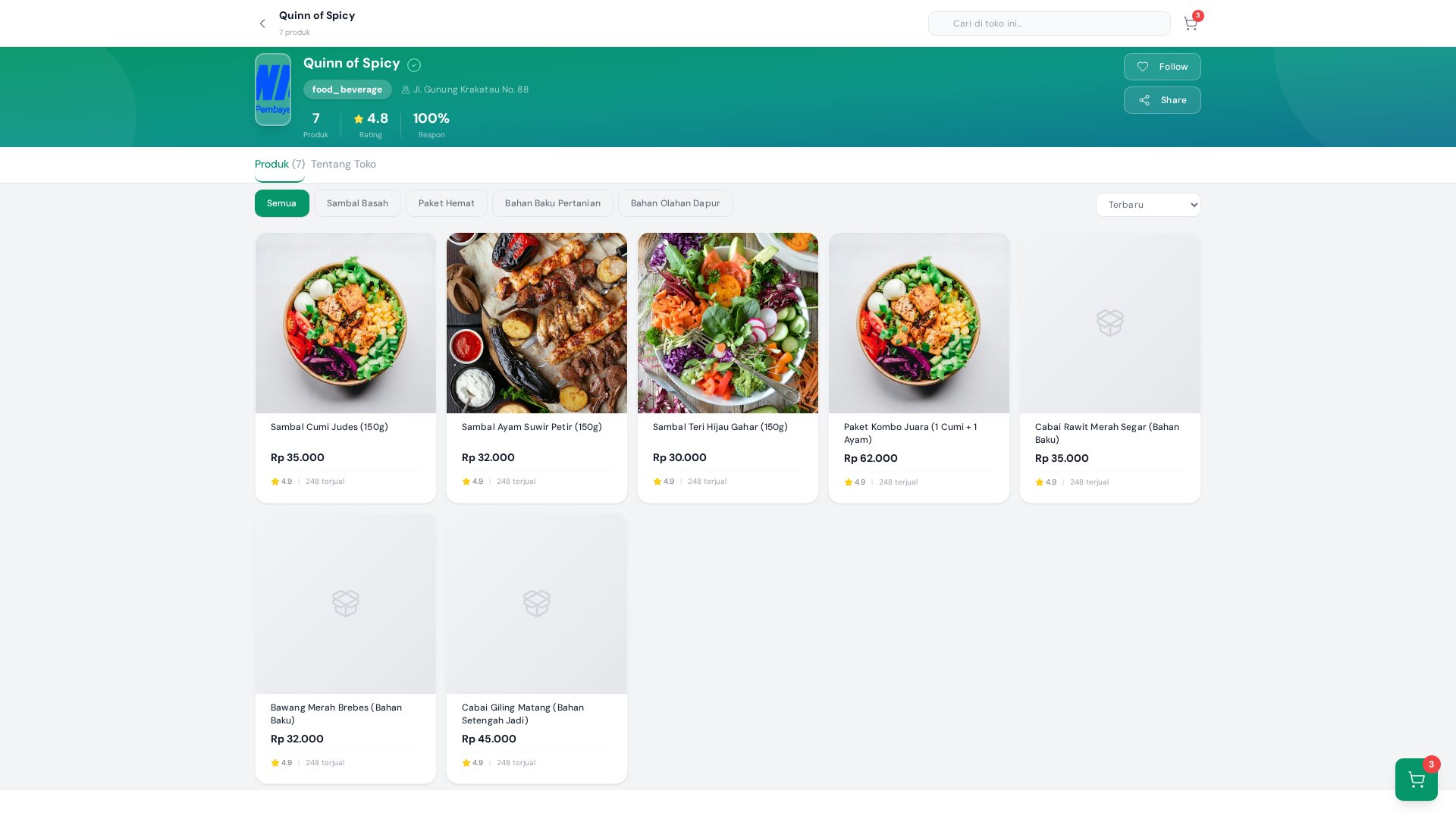 Company Store mengelola tampilan dan pengaturan toko online perusahaan. Halaman ini menghubungkan katalog produk dari Company Products dengan storefront yang dilihat pelanggan. Kamu bisa memilih produk mana yang ditampilkan, mengelompokkannya dalam etalase, mengkustomisasi tampilan (banner, tema, layout), mengatur jam operasional, dan mem-preview semua perubahan sebelum dipublikasikan.
## Arsitektur Company Store
```mermaid theme={null}
graph TB
subgraph "Sumber Data"
CP[Company Products
Company Store mengelola tampilan dan pengaturan toko online perusahaan. Halaman ini menghubungkan katalog produk dari Company Products dengan storefront yang dilihat pelanggan. Kamu bisa memilih produk mana yang ditampilkan, mengelompokkannya dalam etalase, mengkustomisasi tampilan (banner, tema, layout), mengatur jam operasional, dan mem-preview semua perubahan sebelum dipublikasikan.
## Arsitektur Company Store
```mermaid theme={null}
graph TB
subgraph "Sumber Data"
CP[Company Products
Katalog Produk]
DM[Discount Management
Promo & Diskon]
end
subgraph "Company Store Configuration"
ET[Etalase
Kategori & Urutan]
DS[Display Settings
Banner, Tema, Layout]
OP[Operational
Jam Buka, Status]
SL[Slug & SEO
URL, Meta Tags]
end
subgraph "Rendering Pipeline"
PV[Preview Engine
Client-side render]
PUB[Publish
Save to DB]
end
subgraph "Output"
SF[Storefront
Tampilan Pelanggan]
end
CP --> ET
DM --> SF
ET --> PV --> SF
DS --> PV
OP --> SF
SL --> SF
PV --> PUB --> SF
```
## Data Flow: Produk ke Storefront
```mermaid theme={null}
sequenceDiagram
participant Admin
participant CS as Company Store
participant CP as Company Products
participant DM as Discount Mgmt
participant DB as Base44
participant SF as Storefront
Admin->>CS: Pilih produk untuk etalase
CS->>CP: Fetch product catalog
CP-->>CS: Product list + prices
CS->>DM: Fetch active promotions
DM-->>CS: Active discounts
Admin->>CS: Configure display settings
Admin->>CS: Click Preview
CS->>CS: Render storefront preview
Admin->>CS: Approve & Save
CS->>DB: Save etalase + settings
DB-->>SF: Storefront updated
```
## Etalase Produk
### Konsep Etalase
Etalase adalah kumpulan produk yang dikelompokkan dalam kategori tertentu di storefront. Satu produk bisa muncul di beberapa etalase sekaligus.
```mermaid theme={null}
graph TD
STORE[Storefront] --> E1[Produk Terlaris
12 produk]
STORE --> E2[Promo Minggu Ini
8 produk]
STORE --> E3[Koleksi Baru
5 produk]
STORE --> E4[Sambal & Bumbu
15 produk]
STORE --> E5[Keripik & Snack
10 produk]
STORE --> E6[Minuman
6 produk]
P1[Ayam Suwir Petir] -.-> E1
P1 -.-> E4
P2[Sambal Matah] -.-> E2
P2 -.-> E4
P3[Keripik Singkong] -.-> E3
P3 -.-> E5
```
### Entity Etalase
| Field | Tipe | Wajib | Deskripsi |
| - | - | - | - |
| `name` | string | Ya | Nama etalase (contoh: "Produk Terlaris") |
| `description` | string | Tidak | Deskripsi singkat etalase |
| `products` | array | Ya | Daftar product IDs yang dimasukkan |
| `order` | number | Auto | Urutan tampilan (drag & drop) |
| `is_visible` | boolean | Ya | Toggle tampil/sembunyi |
| `banner_url` | string | Tidak | Gambar header etalase |
| `company_id` | FK → Company | Ya | Scope perusahaan |
### Kelola Etalase
| Aksi | Detail | Shortcut |
| - | - | - |
| **Buat Etalase Baru** | Input nama, deskripsi, pilih produk | Tombol "+ Etalase" |
| **Edit Etalase** | Ubah nama, tambah/kurangi produk | Klik icon edit |
| **Urutkan Produk** | Drag & drop untuk atur urutan tampilan | Drag handle |
| **Sembunyikan Etalase** | Toggle visible/hidden | Toggle switch |
| **Hapus Etalase** | Etalase dihapus, produk tetap ada di katalog | Tombol hapus + konfirmasi |
## Tampilan Storefront
### Komponen yang Bisa Dikustomisasi
| Komponen | Pengaturan | Detail | Rekomendasi |
| - | - | - | - |
| **Banner Utama** | Upload gambar | Ukuran rekomendasi: 1200x400px | JPG/PNG \< 500KB |
| **Warna Tema** | Color picker | Warna utama storefront | Sesuaikan brand |
| **Warna Aksen** | Color picker | Warna tombol dan highlight | Kontras dengan tema |
| **Logo Toko** | Upload gambar | Tampil di header | 200x200px, PNG transparan |
| **Layout** | Grid / List | Tampilan produk | Grid untuk visual, List untuk detail |
| **Font** | Dropdown | Gaya huruf | Max 2 font family |
### Preview Sebelum Publish
```mermaid theme={null}
flowchart LR
A[Ubah Pengaturan] --> B[Klik Preview]
B --> C[Render Client-Side
Mirror storefront]
C --> D{Sudah Sesuai?}
D -->|Ya| E[Simpan & Publish]
D -->|Belum| A
E --> F[Update Live Storefront]
```
> **Penting**: Selalu gunakan Preview sebelum menyimpan perubahan. Perubahan yang di-save langsung berlaku di storefront.
## Jam Operasional
| Field | Format | Contoh | Deskripsi |
| - | - | - | - |
| **Jam Buka** | HH:MM | 08:00 | Waktu toko mulai beroperasi |
| **Jam Tutup** | HH:MM | 21:00 | Waktu toko berhenti beroperasi |
| **Hari Operasional** | Multi-select | Senin - Sabtu | Hari-hari toko buka |
| **Status Manual** | Toggle | Buka / Tutup | Override jadwal otomatis |
### Status Otomatis
```mermaid theme={null}
stateDiagram-v2
[*] --> Buka: Jam operasional dimulai
+ toggle = Buka
Buka --> Tutup: Jam operasional berakhir
Tutup --> Buka: Hari berikutnya / Jam buka
Buka --> TutupManual: Owner set "Tutup"
(override)
TutupManual --> Buka: Owner set "Buka"
state Buka {
[*] --> Aktif
Aktif --> MenerimaOrder
}
state Tutup {
[*] --> Offline
Offline --> Maintenance
}
```
| Kondisi | Status yang Ditampilkan | Warna | Order |
| - | - | - | - |
| Dalam jam operasional + toggle Buka | 🟢 **Toko Buka** | Hijau | Diterima |
| Luar jam operasional | 🔴 **Toko Tutup** | Merah | Ditolak |
| Toggle manual Tutup (meski dalam jam operasional) | 🔴 **Toko Tutup Sementara** | Oranye | Ditolak |
## Slug & SEO
| Field | Deskripsi | Contoh | Impact |
| - | - | - | - |
| **Slug** | URL storefront | `quinn-of-spicy` → `yoursite.com/quinn-of-spicy` | URL structure |
| **Meta Title** | Judul di search engine | "Quinn of Spicy - Sambal & Bumbu Nusantara" | SEO ranking |
| **Meta Description** | Deskripsi di search engine | "Toko online resmi Quinn of Spicy..." | Click-through rate |
| **Keywords** | Kata kunci SEO | sambal, bumbu, ayam suwir, pedas | Search visibility |
### SEO Pipeline
```mermaid theme={null}
flowchart LR
A[Input SEO Fields] --> B[Validate Slug
unique, alphanumeric]
B --> C[Generate Meta Tags
title, description, keywords]
C --> D[Inject to Storefront
HTML head]
D --> E[Search Engine
Index]
```
## Hak Akses
| Role | View | Edit Etalase | Edit Display | Edit SEO | Edit Operational |
| - | - | - | - | - | - |
| **Owner** | ✅ | ✅ | ✅ | ✅ | ✅ |
| **Inventory** | ✅ | ✅ | ❌ | ❌ | ❌ |
| **Kasir** | ✅ | ❌ | ❌ | ❌ | ❌ |
| **CS** | ✅ | ❌ | ❌ | ❌ | ❌ |
## Integrasi
| Modul | Integrasi | Detail | Data Flow |
| - | - | - | - |
| **Company Products** | Sumber produk | Produk di etalase berasal dari katalog | Product → Etalase (product\_ids) |
| **Discount Management** | Promo aktif | Diskon ditampilkan di storefront | Discount → Storefront (price override) |
| **POS** | Stok real-time | Stok di storefront = stok Toko Offline | POS Stock → Storefront display |
| **CRM** | Data pelanggan | Pelanggan yang beli di store tercatat | Order → CRM (customer data) |
## Cara Akses
Dari sidebar, klik menu **Inventory** > **Company Store**.
## Flow Penggunaan
1. Buka halaman Company Store dari sidebar
2. **Konfigurasi Etalase**: buat etalase baru, pilih produk dari katalog, atur urutan
3. **Kustomisasi Tampilan**: upload banner, pilih warna tema, atur layout
4. **Set SEO**: isi slug, meta title, meta description, keywords
5. **Atur Jam Operasional**: tentukan jam buka/tutup dan hari operasional
6. **Preview**: klik Preview untuk melihat tampilan seperti yang dilihat pelanggan
7. **Publish**: jika sudah sesuai, simpan perubahan — storefront langsung update
## Tips
* **Update etalase secara berkala** — pelanggan harus selalu melihat produk yang relevan, terutama saat ada promo atau koleksi baru
* **Gunakan banner yang menarik** untuk mengumumkan promo besar atau event spesial di halaman utama toko
* **Selalu preview sebelum publish** — hindari kesalahan tampilan yang bisa membingungkan pelanggan
* **Optimasi gambar** — gunakan gambar produk yang sudah di-compress (\< 200KB) agar storefront loading cepat
* **Pisahkan produk populer** di etalase "Produk Terlaris" untuk meningkatkan konversi
* **Monitor jam operasional** — pastikan toggle manual digunakan dengan benar, terutama saat libur
***
## Entity Schema — Company Store
### Entity Relationship Diagram
```mermaid theme={null}
erDiagram
CompanyPOSCategory ||--o{ POSProduct : "categorizes"
POSProduct ||--o{ CompanyPOSInventory : "tracks stock movement"
POSProduct }o--o{ Discount : "applied promotions"
CompanyPOSSettings ||--|| CompanyPOSCategory : "configures per company"
ShopSettings ||--o{ POSProduct : "showcase"
ShopSettings ||--o{ CompanyPOSCategory : "featured categories"
CompanyPOSCategory {
string company_id PK
string name "Nama kategori"
string description "Penjelasan kategori"
string icon "Icon emoji"
string color "Warna kategori (default #3b82f6)"
number order "Urutan tampilan"
}
POSProduct {
string name "Nama produk"
string sku "SKU/Barcode"
string category FK
string description "Deskripsi produk"
number price "Harga jual"
number cost "Harga modal"
number stock "Stok saat ini"
number min_stock "Minimum stok untuk alert"
string image_url "URL gambar produk"
boolean is_active "Status aktif produk"
number tax_rate "Persentase pajak"
string unit "Satuan produk (default pcs)"
string supplier "Nama supplier"
}
CompanyPOSInventory {
string company_id PK
string product_id FK
string product_name
string type "in | out | adjustment"
number quantity "Jumlah perubahan"
number stock_before "Stok sebelum"
number stock_after "Stok setelah"
string reason "Alasan pergerakan"
string reference_id "ID transaksi terkait"
string notes "Catatan tambahan"
string performed_by "Dilakukan oleh"
}
CompanyPOSSettings {
string company_id PK
string description "Catatan konfigurasi POS"
object receipt_settings "Konfigurasi struk"
}
ShopSettings {
string setting_key PK
string banner_image_url "URL banner toko"
string banner_title "Judul banner"
string banner_subtitle "Subtitle banner"
array featured_categories "Kategori unggulan"
object promo_banner "Banner promo aktif"
object reseller_discounts "Diskon per tier reseller"
}
Discount {
string name "Nama promo"
string type "Tipe diskon"
number value "Nilai diskon"
date start_date "Mulai berlaku"
date end_date "Berakhir"
boolean is_active "Status aktif"
}
```
### Tabel Schema — Entity Store & Catalog
#### CompanyPOSCategory — Kategori Produk POS Perusahaan
| Field | Tipe | Wajib | Default | Deskripsi |
| - | - | - | - | - |
| `company_id` | string | Ya | — | ID perusahaan (scope multi-tenant) |
| `name` | string | Ya | — | Nama kategori (contoh: "Sambal & Bumbu") |
| `description` | string | Tidak | — | Penjelasan jenis produk dalam kategori ini (max 1000 char) |
| `icon` | string | Tidak | — | Icon emoji untuk kategori |
| `color` | string | Tidak | `#3b82f6` | Kode warna hex kategori |
| `order` | number | Tidak | `0` | Urutan tampilan kategori (drag & drop) |
#### POSProduct — Produk Katalog (Store Display Fields)
| Field | Tipe | Wajib | Default | Deskripsi |
| - | - | - | - | - |
| `name` | string | Ya | — | Nama produk yang ditampilkan di storefront |
| `sku` | string | Tidak | — | SKU atau barcode produk |
| `category` | string (FK) | Tidak | — | Referensi ke `CompanyPOSCategory.name` |
| `description` | string | Tidak | — | Deskripsi produk untuk etalase |
| `price` | number | Ya | — | Harga jual yang ditampilkan |
| `cost` | number | Tidak | — | Harga modal/beli (tidak tampil di storefront) |
| `stock` | number | Tidak | `0` | Stok saat ini (sinkron dari POS) |
| `min_stock` | number | Tidak | `5` | Batas minimum stok untuk alert |
| `image_url` | string | Tidak | — | URL gambar produk untuk tampilan etalase |
| `variants` | array\[object] | Tidak | — | Varian produk (ukuran, warna, dll) |
| `is_active` | boolean | Tidak | `true` | Status aktif — menentukan visibilitas di storefront |
| `tax_rate` | number | Tidak | `0` | Persentase pajak (0–100) |
| `unit` | string | Tidak | `pcs` | Satuan produk (pcs, box, kg, dll) |
| `supplier` | string | Tidak | — | Nama supplier produk |
| `digital_product_id` | string | Tidak | — | ID dari DigitalProduct jika sinkronisasi |
| `is_synced_from_digital` | boolean | Tidak | `false` | Flag apakah produk disinkronkan dari DigitalProduct |
| `last_synced` | datetime | Tidak | — | Waktu terakhir sinkronisasi |
#### CompanyPOSSettings — Pengaturan POS Perusahaan
| Field | Tipe | Wajib | Default | Deskripsi |
| - | - | - | - | - |
| `company_id` | string | Ya | — | ID perusahaan |
| `description` | string | Tidak | — | Catatan konfigurasi sistem POS (max 1000 char) |
| `receipt_settings` | object | Tidak | — | Konfigurasi lengkap struk belanja |
**Sub-field `receipt_settings`:**
| Field | Tipe | Default | Deskripsi |
| - | - | - | - |
| `logo_url` | string | — | URL logo perusahaan untuk struk |
| `business_name` | string | — | Nama bisnis yang tampil di struk |
| `business_address` | string | — | Alamat lengkap bisnis |
| `business_phone` | string | — | Nomor telepon bisnis |
| `business_email` | string | — | Email bisnis |
| `tax_id` | string | — | NPWP / Tax ID perusahaan |
| `receipt_width` | enum | `80mm` | Ukuran kertas struk: `58mm` \| `80mm` |
| `show_logo` | boolean | `true` | Tampilkan logo di struk |
| `show_tax_id` | boolean | `false` | Tampilkan NPWP di struk |
| `show_cashier_name` | boolean | `true` | Tampilkan nama kasir di struk |
| `show_customer_info` | boolean | `true` | Tampilkan informasi pelanggan di struk |
| `show_item_image` | boolean | `false` | Tampilkan gambar produk di struk |
| `header_text` | string | `STRUK PEMBELIAN` | Teks header struk |
| `footer_message` | string | `Terima kasih...` | Pesan footer struk |
| `print_auto_after_transaction` | boolean | `true` | Auto-print struk setelah transaksi |
| `font_size` | enum | `medium` | Ukuran font struk: `small` \| `medium` \| `large` |
#### ShopSettings — Pengaturan Tampilan Toko
| Field | Tipe | Wajib | Default | Deskripsi |
| - | - | - | - | - |
| `setting_key` | string | Ya | — | Kunci pengaturan unik |
| `banner_image_url` | string | Tidak | — | URL gambar banner utama toko |
| `banner_title` | string | Tidak | — | Judul banner utama |
| `banner_subtitle` | string | Tidak | — | Subtitle banner utama |
| `featured_categories` | array\[string] | Tidak | — | Daftar ID kategori yang di-featured |
| `promo_banner` | object | Tidak | — | Konfigurasi banner promo aktif |
| `reseller_discounts` | object | Tidak | — | Diskon persentase per tier reseller |
**Sub-field `promo_banner`:**
| Field | Tipe | Default | Deskripsi |
| - | - | - | - |
| `active` | boolean | — | Status aktif promo banner |
| `title` | string | — | Judul promo banner |
| `description` | string | — | Deskripsi promo |
| `discount_percentage` | number | — | Persentase diskon promo |
| `valid_until` | datetime | — | Berlaku sampai tanggal |
**Sub-field `reseller_discounts`:**
| Tier | Default | Deskripsi |
| - | - | - |
| `free` | `0` | Diskon tier Free (0%) |
| `pro` | `0.05` | Diskon tier Pro (5%) |
| `business` | `0.10` | Diskon tier Business (10%) |
| `advanced` | `0.15` | Diskon tier Advanced (15%) |
| `enterprise` | `0.20` | Diskon tier Enterprise (20%) |
#### CompanyPOSInventory — Log Pergerakan Stok
| Field | Tipe | Wajib | Deskripsi |
| - | - | - | - |
| `company_id` | string | Ya | ID perusahaan |
| `product_id` | string | Ya | ID produk yang berubah stoknya |
| `product_name` | string | Tidak | Nama produk (denormalized untuk reporting) |
| `type` | enum | Ya | Tipe pergerakan: `in` \| `out` \| `adjustment` |
| `quantity` | number | Ya | Jumlah perubahan stok |
| `stock_before` | number | Tidak | Stok sebelum perubahan |
| `stock_after` | number | Tidak | Stok setelah perubahan |
| `reason` | string | Tidak | Alasan pergerakan (pembelian, penjualan, rusak, dll) |
| `reference_id` | string | Tidak | ID transaksi terkait |
| `notes` | string | Tidak | Catatan tambahan |
| `performed_by` | string | Tidak | User yang melakukan perubahan |
### State Machine — Visibilitas Produk di Storefront
```mermaid theme={null}
stateDiagram-v2
[*] --> Draft: Produk baru dibuat
(is_active = false)
Draft --> Aktif: Admin set is_active = true
+ stok > 0
Aktif --> Draft: Admin set is_active = false
Aktif --> StokHabis: Stok mencapai 0
StokHabis --> Aktif: Stok di-restock (stock > 0)
StokHabis --> Draft: Admin set is_active = false
Aktif --> NonaktifPermanen: Produk di-discontinue
Draft --> NonaktifPermanen: Produk dibatalkan
StokHabis --> NonaktifPermanen: Produk di-discontinue
state Aktif {
[*] --> Ditampilkan
Ditampilkan --> PromoAktif: Discount applied
PromoAktif --> Ditampilkan: Discount expired
}
state NonaktifPermanen {
[*] --> DihapusDariEtalase
}
```
| State | `is_active` | `stock` | Tampil di Storefront | Order Diterima |
| - | - | - | - | - |
| **Draft** | `false` | Berapapun | Tidak | Tidak |
| **Aktif (Ditampilkan)** | `true` | `> 0` | Ya | Ya |
| **Aktif (Promo)** | `true` | `> 0` | Ya + badge diskon | Ya |
| **Stok Habis** | `true` | `= 0` | Ya (label "Habis") | Tidak |
| **Nonaktif Permanen** | `false` | — | Tidak | Tidak |
### Sequence Diagram — Storefront Product Listing
```mermaid theme={null}
sequenceDiagram
participant Pelanggan
participant SF as Storefront
participant API as Backend API
participant PP as POSProduct
participant CPC as CompanyPOSCategory
participant INV as CompanyPOSInventory
participant DM as Discount Mgmt
participant SS as ShopSettings
Pelanggan->>SF: Akses storefront URL
SF->>API: GET /store/{slug}
API->>SS: Fetch shop settings
(banner, theme, layout)
SS-->>API: Shop config
API->>CPC: Fetch active categories
(ordered by `order`)
CPC-->>API: Category list
API->>PP: Fetch active products
(is_active = true, stock > 0)
PP-->>API: Product list
API->>DM: Fetch active promotions
DM-->>API: Discount list
API->>INV: Fetch current stock levels
INV-->>API: Stock data
API-->>SF: Rendered storefront data
(categories + products + prices + stock)
SF-->>Pelanggan: Tampilkan storefront
```
### Sequence Diagram — Category Filtering
```mermaid theme={null}
sequenceDiagram
participant Pelanggan
participant SF as Storefront
participant API as Backend API
participant PP as POSProduct
participant CPC as CompanyPOSCategory
participant DM as Discount Mgmt
Pelanggan->>SF: Klik kategori "Sambal & Bumbu"
SF->>API: GET /store/{slug}/products?category=sambal-bumbu
API->>CPC: Resolve category by name/slug
CPC-->>API: category_id
API->>PP: Fetch products WHERE
category = category_id
AND is_active = true
PP-->>API: Filtered product list
API->>DM: Check active discounts
for filtered products
DM-->>API: Applicable discounts
API->>API: Calculate final prices
(apply discount if any)
API->>API: Sort by `order` field
API-->>SF: Filtered + sorted products
with final prices
SF-->>Pelanggan: Tampilkan produk dalam kategori
Pelanggan->>SF: Klik "Semua Kategori"
SF->>API: GET /store/{slug}/products
API-->>SF: All active products
SF-->>Pelanggan: Tampilkan semua produk
```
### Enum Tables
#### `display_status` — Status Tampilan Produk di Storefront
| Nilai | Deskripsi | Kondisi | Tampil |
| - | - | - | - |
| `draft` | Produk belum dipublikasikan | `is_active = false` | Tidak |
| `active` | Produk aktif dan ditampilkan | `is_active = true` AND `stock > 0` | Ya |
| `out_of_stock` | Produk aktif tapi stok habis | `is_active = true` AND `stock = 0` | Ya (label "Habis") |
| `discontinued` | Produk sudah tidak dijual | `is_active = false` (permanen) | Tidak |
| `promo` | Produk sedang dalam promo | `active` + ada discount aktif | Ya + badge |
#### `category_key` — Kunci Kategori Bawaan (Default Etalase)
| Nilai | Deskripsi | Icon | Urutan |
| - | - | - | - |
| `bestseller` | Produk terlaris — otomatis terisi berdasarkan volume penjualan | 🏆 | 0 |
| `new_arrival` | Koleksi baru — produk yang baru ditambahkan | 🆕 | 1 |
| `promo` | Promo minggu ini — produk dengan diskon aktif | 🔥 | 2 |
| `sambal_bumbu` | Kategori Sambal & Bumbu | 🌶️ | 3 |
| `keripik_snack` | Kategori Keripik & Snack | 🍿 | 4 |
| `minuman` | Kategori Minuman | 🥤 | 5 |
| `custom` | Kategori kustom yang dibuat admin | 📦 | 6+ |
#### `inventory_type` — Tipe Pergerakan Stok
| Nilai | Deskripsi | Impact Stok | Contoh |
| - | - | - | - |
| `in` | Stok masuk | `stock + quantity` | Pembelian dari supplier, retur masuk |
| `out` | Stok keluar | `stock - quantity` | Penjualan, retur ke supplier |
| `adjustment` | Penyesuaian stok | `stock ± quantity` | Stok opname, barang rusak, koreksi |
#### `receipt_width` — Ukuran Kertas Struk
| Nilai | Lebar | Penggunaan |
| - | - | - |
| `58mm` | 58 mm | Printer portable kecil |
| `80mm` | 80 mm | Printer kasir standar (default) |
### RBAC — Hak Akses Entity Store
| Role | View Store | Edit Etalase | Edit Display | Edit SEO | Edit Operational | Edit POS Settings | View Inventory Log |
| - | - | - | - | - | - | - | - |
| **Owner** | ✅ | ✅ | ✅ | ✅ | ✅ | ✅ | ✅ |
| **Inventory** | ✅ | ✅ | ❌ | ❌ | ❌ | ❌ | ✅ |
| **Kasir** | ✅ | ❌ | ❌ | ❌ | ❌ | ❌ | ❌ |
| **CS** | ✅ | ❌ | ❌ | ❌ | ❌ | ❌ | ❌ |
> **Catatan**: Hak akses di atas berlaku untuk entity `POSProduct`, `CompanyPOSCategory`, `CompanyPOSSettings`, `CompanyPOSInventory`, dan `ShopSettings`. Role **Inventory** hanya bisa mengelola etalase (kategori & urutan produk) dan melihat log stok, tetapi tidak bisa mengubah pengaturan tampilan, SEO, atau konfigurasi POS.
This documentation is built and hosted on [Mintlify](https://mintlify.com), a developer documentation platform.