> ## Documentation Index
> Fetch the complete documentation index at: https://docs.quinnsambal.com/llms.txt
> Use this file to discover all available pages before exploring further.
# Multi location
***
title: "Multi-Location"
description: "Stok terpisah per lokasi, transfer antar gudang dengan approval, reporting per lokasi, dan integrasi POS/Manufacturing."
--------------------------------------------------------------------------------------------------------------------------------------
# Multi-Location
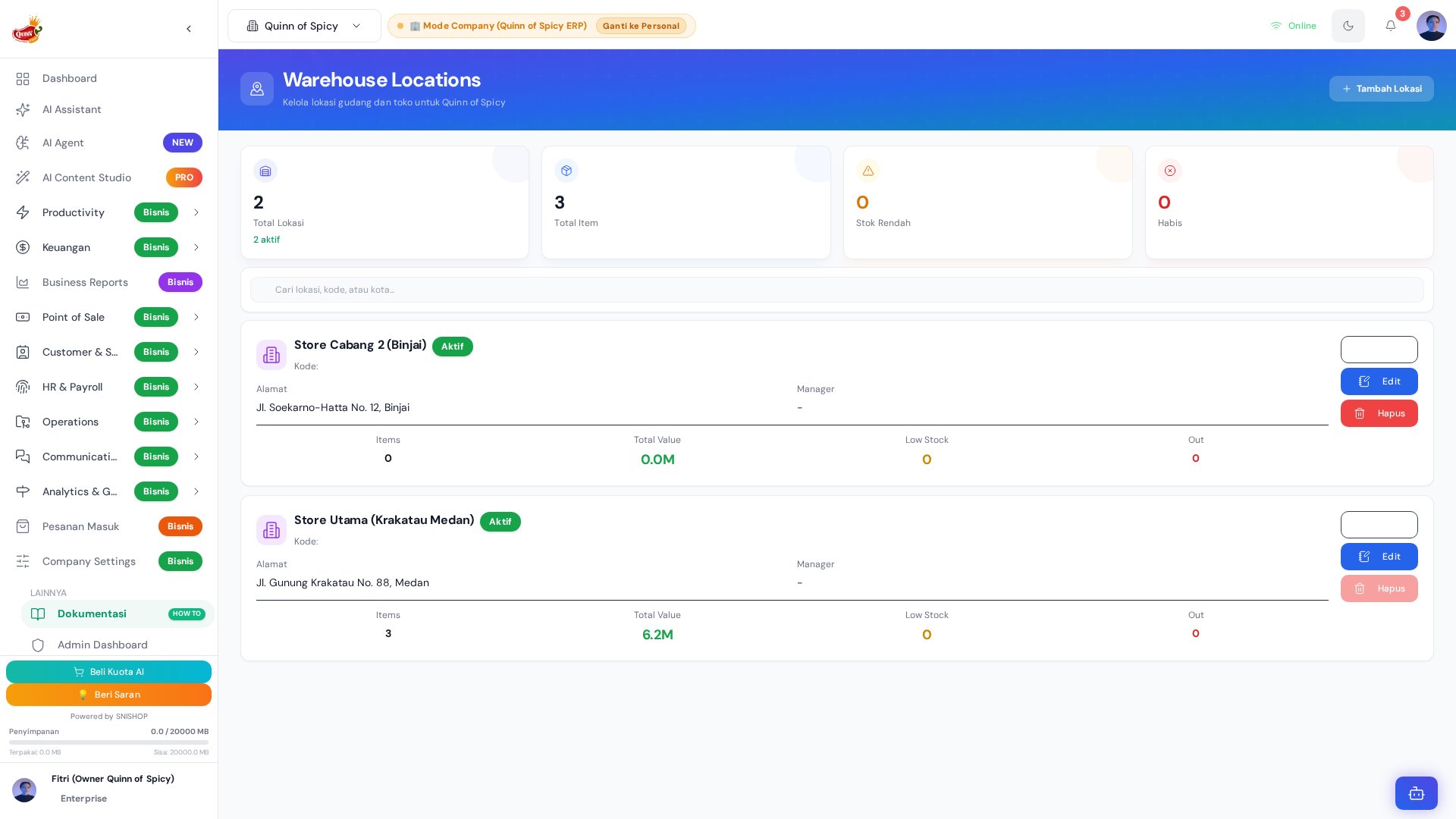 Sistem inventori Quinn of Spicy mendukung **multi-location** — setiap produk memiliki stok yang terpisah di setiap lokasi gudang. Dengan 3 lokasi aktif (Gudang Utama, Toko Offline, Gudang Reserve), kamu bisa mengontrol distribusi stok, melakukan transfer antar lokasi, dan melihat laporan performa masing-masing gudang secara independen.
## Arsitektur Multi-Location
```mermaid theme={null}
graph TB
subgraph "3 Lokasi Aktif"
GU[Gudang Utama
Sistem inventori Quinn of Spicy mendukung **multi-location** — setiap produk memiliki stok yang terpisah di setiap lokasi gudang. Dengan 3 lokasi aktif (Gudang Utama, Toko Offline, Gudang Reserve), kamu bisa mengontrol distribusi stok, melakukan transfer antar lokasi, dan melihat laporan performa masing-masing gudang secara independen.
## Arsitektur Multi-Location
```mermaid theme={null}
graph TB
subgraph "3 Lokasi Aktif"
GU[Gudang Utama
🏭 Produksi & Penyimpanan
PIC: Kepala Produksi
Kapasitas: 5.000 unit]
TO[Toko Offline
🏪 Penjualan Langsung
PIC: Store Manager
Kapasitas: 500 unit]
GR[Gudang Reserve
📦 Safety Stock & Cadangan
PIC: Inventory Manager
Kapasitas: 3.000 unit]
end
GU <-->|Transfer
Approval jika >= 50| TO
GU <-->|Transfer
Approval jika >= 50| GR
TO <-->|Transfer
Approval jika >= 50| GR
POS[POS Transaction] -->|Stock Out| TO
MFG[Manufacturing] -->|Raw Material| GU
MFG -->|Finished Goods| GU
PO[Purchase Order] -->|Stock In| GU
PO -->|Stock In| GR
```
## Stok Per Lokasi — Contoh
Setiap produk memiliki 3 baris stok (satu per lokasi) plus total:
**Contoh: Ayam Suwir Petir (150g)**
| Lokasi | Stok | Min. Stok | Status | Nilai (HPP) |
| - | - | - | - | - |
| Gudang Utama | 100 unit | 30 unit | 🟢 Normal | Rp 2.100.000 |
| Toko Offline | 30 unit | 10 unit | 🟢 Normal | Rp 630.000 |
| Gudang Reserve | 50 unit | 20 unit | 🟢 Normal | Rp 1.050.000 |
| **Total** | **180 unit** | **60 unit** | **🟢 Aman** | **Rp 3.780.000** |
**Contoh: Sambal Matah (100ml) — Low Stock**
| Lokasi | Stok | Min. Stok | Status | Nilai (HPP) |
| - | - | - | - | - |
| Gudang Utama | 15 unit | 30 unit | 🟡 Low | Rp 90.000 |
| Toko Offline | 5 unit | 10 unit | 🟡 Low | Rp 30.000 |
| Gudang Reserve | 0 unit | 15 unit | 🔴 Out | Rp 0 |
| **Total** | **20 unit** | **55 unit** | **🔴 Critical** | **Rp 120.000** |
## Transfer Antar Lokasi
### Flow Transfer
```mermaid theme={null}
sequenceDiagram
participant U as User
participant S as Sistem
participant FL as From Location
participant TL as To Location
participant A as Approver (jika perlu)
U->>S: Pilih produk, from, to, qty
S->>S: Validasi stok di from location
alt Qty < 50 unit
S->>S: Auto-approve
S->>FL: Deduct stok
S->>TL: Add stok
S-->>U: Transfer berhasil
else Qty >= 50 unit
S->>A: Kirim approval request
A->>S: Approve
S->>FL: Deduct stok
S->>TL: Add stok
S-->>U: Transfer disetujui & diproses
end
```
### Field Transfer
| Field | Wajib | Deskripsi |
| - | - | - |
| **Produk** | Ya | Pilih produk (bisa multi-item) |
| **Lokasi Asal** | Ya | Gudang mana stok diambil |
| **Lokasi Tujuan** | Ya | Gudang mana stok dikirim |
| **Quantity** | Ya | Jumlah unit (tidak boleh > stok tersedia) |
| **Notes** | Tidak | Alasan transfer, instruksi khusus |
| **Tanggal** | Ya | Default hari ini |
### Aturan Transfer
| Aturan | Detail |
| - | - |
| **Lokasi sama** | Tidak bisa transfer ke lokasi yang sama |
| **Validasi stok** | Qty tidak boleh > stok di lokasi asal |
| **Auto-approve** | Transfer \< 50 unit langsung diproses |
| **Butuh approval** | Transfer >= 50 unit perlu persetujuan manager |
| **Atomic** | Deduct dan add terjadi dalam satu transaksi — tidak ada kasus stok hilang di tengah |
| **Audit trail** | Setiap transfer dicatat: siapa, kapan, dari mana, ke mana, berapa |
### Transfer History
| Kolom | Deskripsi |
| - | - |
| **Tanggal & Waktu** | Timestamp transfer |
| **Produk** | Nama dan SKU |
| **From** | Lokasi asal |
| **To** | Lokasi tujuan |
| **Quantity** | Jumlah unit |
| **User** | Siapa yang melakukan |
| **Status** | Completed, Pending Approval, Rejected |
| **Notes** | Catatan transfer |
## Reporting Per Lokasi
### Stock Report Per Lokasi
| Metrik | Gudang Utama | Toko Offline | Gudang Reserve | Total |
| - | - | - | - | - |
| **Total Item** | 450 | 120 | 380 | 950 |
| **Total Nilai** | Rp 45.000.000 | Rp 8.500.000 | Rp 22.000.000 | Rp 75.500.000 |
| **Low Stock Items** | 5 | 2 | 8 | 15 |
| **Out of Stock** | 1 | 0 | 3 | 4 |
| **Expired Items** | 2 | 1 | 0 | 3 |
### Sales Report Per Lokasi
| Metrik | Gudang Utama | Toko Offline | Gudang Reserve |
| - | - | - | - |
| **Revenue (bulan ini)** | Rp 15.000.000 | Rp 45.000.000 | - |
| **Transaksi** | 120 | 850 | - |
| **Avg Transaction** | Rp 125.000 | Rp 52.941 | - |
| **Top Product** | Sambal Petir 500g | Ayam Suwir 150g | - |
### Movement Summary Per Lokasi
| Metrik | Gudang Utama | Toko Offline | Gudang Reserve |
| - | - | - | - |
| **Stock In** | +2.500 | +800 | +500 |
| **Stock Out** | -1.800 | -750 | -100 |
| **Transfer In** | +100 | +600 | +200 |
| **Transfer Out** | -800 | -50 | -350 |
| **Net Movement** | 0 | +600 | +250 |
## Distribusi Stok — Best Practices
| Lokasi | Fungsi | Stok Ideal | Kapan Restock |
| - | - | - | - |
| **Toko Offline** | Stok untuk 1 minggu penjualan | 50-100 unit per produk fast-moving | Setiap pagi |
| **Gudang Utama** | Stok untuk 1 bulan produksi | 500-2.000 unit bahan baku | Setelah PO diterima |
| **Gudang Reserve** | Safety stock untuk darurat | 20-50% dari total stok | Saat stok Gudang Utama penuh |
### Jadwal Transfer Harian
```mermaid theme={null}
gantt
title Jadwal Transfer Harian
dateFormat HH:mm
axisFormat %H:%M
section Pagi
Transfer Gudang → Toko :0600, 30min
Cek Stok Toko :0630, 15min
section Siang
Transfer Produksi → Gudang :1200, 30min
Cek Stok Gudang :1230, 15min
section Sore
Transfer Reserve → Gudang :1600, 30min
Rekap Stok Harian :1630, 30min
```
## POS Location Selection
Saat transaksi POS, kasir memilih lokasi yang akan digunakan:
| Step | Detail |
| - | - |
| 1. Kasir login | Sistem mendeteksi outlet kasir |
| 2. Pilih produk | Stok ditampilkan dari lokasi yang di-assign ke outlet |
| 3. Transaksi | Stok otomatis deducted dari lokasi tersebut |
| 4. Receipt | Menampilkan lokasi toko pada struk |
| 5. Report | Transaksi tercatat per lokasi |
## Manufacturing Location
Produksi selalu terpusat di **Gudang Utama**:
| Aspek | Detail |
| - | - |
| **Raw Material Consumption** | Diambil dari Gudang Utama |
| **Finished Goods Output** | Masuk ke Gudang Utama |
| **WIP Tracking** | Di Gudang Utama |
| **Produksi di lokasi lain** | Tidak didukung |
## Setup Lokasi Baru
| Step | Aksi | Detail |
| - | - | - |
| 1 | Buka Company Settings → Locations | Navigasi ke pengaturan lokasi |
| 2 | Klik "Add Location" | Form tambah lokasi baru |
| 3 | Isi data lokasi | Nama, alamat, PIC, telepon, jam operasional |
| 4 | Tentukan tipe | Gudang, Toko, Reserve, Transit |
| 5 | Save | Lokasi baru siap digunakan |
### Syarat Hapus Lokasi
Lokasi hanya bisa dihapus jika **semua** kondisi berikut terpenuhi:
| Syarat | Validasi |
| - | - |
| Stok = 0 | Tidak ada stok di lokasi ini |
| Tidak ada transaksi | Tidak ada PO/POS yang menggunakan lokasi ini |
| Tidak ada pending transfer | Tidak ada transfer yang menunggu |
| Tidak di-assign | Tidak ada outlet yang menggunakan lokasi ini |
## Tips
* **Distribusi stok yang seimbang** — jangan menumpuk semua stok di satu lokasi. Gunakan Gudang Reserve sebagai buffer.
* **Transfer terjadwal** — buat jadwal transfer harian (pagi ke toko, siang dari produksi) supaya stok selalu tersedia.
* **Monitor kapasitas** — jangan biarkan kapasitas lokasi melebihi 80% supaya ada ruang untuk operasional.
***
## Entity Relationship Diagram (ERD)
Diagram berikut menggambarkan relasi antar entitas yang terlibat dalam operasi multi-location inventory. Data ini diambil langsung dari schema `base44/entities/`.
```mermaid theme={null}
erDiagram
WarehouseLocation ||--o{ StockTransfer : "from_location_id / to_location_id"
WarehouseLocation ||--o{ StockMovement : "location_id"
WarehouseLocation ||--o{ StockAlert : "location_id"
WarehouseLocation ||--o{ CompanyPOSInventory : "via location assignment"
CompanyPOSProduct ||--o{ StockTransfer : "product_id"
CompanyPOSProduct ||--o{ StockMovement : "product_id"
CompanyPOSProduct ||--o{ CompanyPOSInventory : "product_id"
StockTransfer ||--o{ StockMovement : "menghasilkan 2 record (out + in)"
StockTransfer }o--|| WarehouseLocation : "from_location_id"
StockTransfer }o--|| WarehouseLocation : "to_location_id"
StockMovement }o--|| CompanyPOSInventory : "inventory_id"
StockMovement }o--|| WarehouseLocation : "location_id"
StockMovement }o--o| StockTransfer : "reference_id (transfer)"
StockAlert }o--|| CompanyPOSInventory : "inventory_id"
StockAlert }o--|| WarehouseLocation : "location_id"
WarehouseLocation {
string company_id PK
string location_name
string location_code UK
string location_type "warehouse|store|transit|virtual"
string address
string city
string manager_name
string manager_contact
number capacity
number current_utilization
boolean is_active
object coordinates "latitude, longitude"
}
StockTransfer {
string company_id PK
string transfer_number UK "TRF-YYYYMMDD-XXXX"
string from_location_id FK
string from_location_name
string to_location_id FK
string to_location_name
string product_id FK
string product_name
string product_sku
string lot_id
string lot_number
number quantity_sent
number quantity_received
number discrepancy_quantity
string discrepancy_reason
string transfer_mode "in_transit|direct"
string status "draft|in_transit|completed|cancelled"
number unit_cost
number total_value
date transfer_date
datetime shipped_at
string shipped_by
datetime received_at
string received_by
string cost_status "complete|provisional_zero_cost|unassigned"
}
StockMovement {
string company_id PK
string inventory_id FK
string product_id FK
string movement_type "in|out|transfer|adjustment|return|damaged|hold|hold_release"
number quantity
number stock_before
number stock_after
string reference_type "transfer|purchase|sale|production|..."
string reference_id FK "StockTransfer ID"
string location_id FK
string from_location_id FK "untuk transfer"
string to_location_id FK "untuk transfer"
number unit_cost
number total_value
string performed_by
string idempotency_key
}
CompanyPOSInventory {
string company_id PK
string product_id FK
string type "in|out|adjustment"
number quantity
number stock_before
number stock_after
string reason
string reference_id
string performed_by
}
StockAlert {
string company_id PK
string inventory_id FK
string product_id FK
string location_id FK
string alert_type "low_stock|out_of_stock|overstock|..."
number current_quantity
number threshold_quantity
string severity "low|medium|high|critical"
string status "active|acknowledged|dismissed|resolved"
}
```
### Penjelasan Relasi (Bahasa Indonesia)
Relasi antar entitas di atas bekerja sebagai berikut:
1. **WarehouseLocation → StockTransfer**: Setiap transfer menghubungkan dua lokasi — `from_location_id` (asal) dan `to_location_id` (tujuan). Satu lokasi bisa terlibat di banyak transfer, baik sebagai pengirim maupun penerima.
2. **StockTransfer → StockMovement**: Saat transfer selesai (status `completed`), sistem membuat **2 record** `StockMovement` — satu di lokasi asal (`movement_type = "transfer"`, quantity negatif) dan satu di lokasi tujuan (`movement_type = "transfer"`, quantity positif). Kedua record ini terhubung ke `StockTransfer` via `reference_id`.
3. **StockMovement → CompanyPOSInventory**: Setiap movement tercatat di ledger inventori (`inventory_id`) dengan `stock_before` dan `stock_after` untuk audit trail penuh.
4. **WarehouseLocation → StockAlert**: Alert stok rendah, habis, atau berlebih terikat pada lokasi tertentu. Ini memungkinkan monitoring per lokasi secara independen.
5. **StockAlert → CompanyPOSInventory**: Alert mereferensikan record inventori yang memicu kondisi anomali (`inventory_id`).
***
## Entity Schema: StockTransfer (Transfer Antar Lokasi)
Tabel berikut mendetailkan seluruh field `StockTransfer`. Schema ini diambil dari `base44/entities/StockTransfer.jsonc`.
### Field Identitas & Referensi
| Field | Tipe | Wajib | Default | Deskripsi |
| - | - | - | - | - |
| `company_id` | string | **Ya** | - | ID perusahaan (multi-tenant) |
| `transfer_number` | string | Tidak | Auto | Nomor dokumen transfer unik (format: `TRF-YYYYMMDD-XXXX`) |
| `from_location_id` | string | **Ya** | - | ID lokasi gudang/toko asal |
| `from_location_name` | string | Tidak | - | Nama lokasi asal (denormalized) |
| `to_location_id` | string | **Ya** | - | ID lokasi gudang/toko tujuan |
| `to_location_name` | string | Tidak | - | Nama lokasi tujuan (denormalized) |
| `product_id` | string | **Ya** | - | ID produk `CompanyPOSProduct` |
| `product_name` | string | Tidak | - | Nama produk (denormalized) |
| `product_sku` | string | Tidak | - | SKU produk |
### Field Kategori, Varian & Lot (Denormalized)
| Field | Tipe | Deskripsi |
| - | - | - |
| `category_key` | string | Key kategori canonical (kecil, besar, pouch, bundle, snack) |
| `category_name` | string | Label kategori yang ditampilkan |
| `variant_key` | string | Key varian canonical (original, extra\_spicy, bundle) |
| `variant_name` | string | Label varian yang ditampilkan |
| `variant_label` | string | Gabungan kategori + varian untuk label POS |
| `size_grams` | number | Ukuran produk dalam gram |
| `base_product_key` | string | Kunci produk utama sebelum dipecah per kategori/varian |
| `lot_id` | string | ID lot/batch asal untuk traceability |
| `lot_number` | string | Nomor label lot batch fisik |
### Field Kuantitas & Nilai
| Field | Tipe | Wajib | Default | Deskripsi |
| - | - | - | - | - |
| `quantity_sent` | number | **Ya** | - | Kuantitas yang dikirim dari lokasi asal |
| `quantity_received` | number | Tidak | 0 | Kuantitas riil yang diterima di lokasi tujuan |
| `discrepancy_quantity` | number | Tidak | 0 | Selisih: `quantity_sent - quantity_received` |
| `discrepancy_reason` | string | Tidak | - | Alasan selisih (barang rusak/hilang di jalan) |
| `unit_cost` | number | Tidak | 0 | Harga modal/HPP per unit produk |
| `total_value` | number | Tidak | 0 | Nilai total transfer: `quantity_sent × unit_cost` |
### Field Status & Mode
| Field | Tipe | Wajib | Default | Enum / Format | Deskripsi |
| - | - | - | - | - | - |
| `transfer_mode` | string | Tidak | `in_transit` | `in_transit`, `direct` | Mode transfer: alur 2-tahap atau instan |
| `status` | string | Tidak | `in_transit` | `draft`, `in_transit`, `completed`, `cancelled` | Status siklus hidup dokumen transfer |
| `cost_status` | string | Tidak | `complete` | `complete`, `provisional_zero_cost`, `unassigned` | Status kelengkapan biaya transfer |
### Field Tanggal & Aktor
| Field | Tipe | Format | Deskripsi |
| - | - | - | - |
| `transfer_date` | string | `YYYY-MM-DD` | Tanggal transfer |
| `shipped_at` | string | `date-time` | Waktu pengiriman berangkat |
| `shipped_by` | string | - | Email/identitas petugas yang mengirim |
| `received_at` | string | `date-time` | Waktu barang diterima di tujuan |
| `received_by` | string | - | Email/identitas petugas yang menerima |
| `cancelled_at` | string | `date-time` | Waktu pembatalan |
| `cancelled_by` | string | - | Email/identitas pembatal |
| `cancellation_reason` | string | - | Alasan pembatalan |
### Field Keterangan & Metadata
| Field | Tipe | Deskripsi |
| - | - | - |
| `reason` | string | Alasan pengiriman (restock, pemerataan outlet, dll) |
| `notes` | string | Catatan tambahan transfer |
| `idempotency_key` | string | Kunci idempotensi operasi (mencegah duplikasi) |
| `metadata` | object | Metadata teknis audit dan korelasi (JSON) |
### Contoh Record StockTransfer
```json theme={null}
{
"company_id": "comp_abc123",
"transfer_number": "TRF-20260115-0001",
"from_location_id": "wh_gudang_utama",
"from_location_name": "Gudang Utama",
"to_location_id": "wh_toko_offline",
"to_location_name": "Toko Offline",
"product_id": "prod_sambal_petir_150",
"product_name": "Ayam Suwir Petir 150g",
"product_sku": "QSP-ASP-150",
"lot_id": "LOT-20260110-A1",
"lot_number": "BATCH-10-JAN",
"quantity_sent": 50,
"quantity_received": 48,
"discrepancy_quantity": 2,
"discrepancy_reason": "2 unit rusak saat pengiriman (kemasan pecah)",
"transfer_mode": "in_transit",
"status": "completed",
"unit_cost": 21000,
"total_value": 1050000,
"transfer_date": "2026-01-15",
"shipped_at": "2026-01-15T06:30:00Z",
"shipped_by": "kepala_produksi@quinnofspicy.com",
"received_at": "2026-01-15T07:15:00Z",
"received_by": "store_manager@quinnofspicy.com",
"reason": "Restok harian toko offline",
"cost_status": "complete"
}
```
***
## Entity Schema: StockMovement (Field Transfer)
Tabel berikut mendetailkan field-field `StockMovement` yang relevan khusus untuk pergerakan bertipe **transfer** antar lokasi. Schema lengkap ada di halaman Stock Management.
### Field Transfer-Specific
| Field | Tipe | Wajib | Deskripsi |
| - | - | - | - |
| `movement_type` | string | **Ya** | Selalu bernilai `transfer` untuk perpindahan antar lokasi |
| `reference_type` | string | Tidak | Bernilai `transfer` — merujuk ke `StockTransfer` |
| `reference_id` | string | Tidak | ID `StockTransfer` yang menjadi sumber pergerakan |
| `location_id` | string | Tidak | ID lokasi tempat stok berubah (lokasi saat ini) |
| `location_name` | string | Tidak | Nama lokasi (denormalized) |
| `from_location_id` | string | Tidak | Lokasi asal transfer |
| `to_location_id` | string | Tidak | Lokasi tujuan transfer |
| `quantity` | number | **Ya** | Jumlah perubahan (negatif di asal, positif di tujuan) |
| `stock_before` | number | Tidak | Stok sebelum transfer |
| `stock_after` | number | Tidak | Stok setelah transfer |
| `unit_cost` | number | Tidak | Harga modal per unit saat transfer |
| `total_value` | number | Tidak | `quantity × unit_cost` |
### Dua Record per Transfer
Setiap `StockTransfer` yang selesai menghasilkan **2 record** `StockMovement`:
| Record | `location_id` | `from_location_id` | `to_location_id` | `quantity` | Efek |
| - | - | - | - | - | - |
| **Out (asal)** | `from_location_id` | Gudang Utama | Toko Offline | **-50** | Stok Gudang Utama berkurang |
| **In (tujuan)** | `to_location_id` | Gudang Utama | Toko Offline | **+50** | Stok Toko Offline bertambah |
> **Catatan:** Kedua record terhubung ke `StockTransfer` yang sama via `reference_id` dan dilindungi oleh `idempotency_key` untuk mencegah duplikasi.
***
## Entity Schema: CompanyPOSInventory (Ledger Stok)
`CompanyPOSInventory` berfungsi sebagai ledger (buku besar) inventori yang mencatat setiap perubahan stok per produk.
| Field | Tipe | Wajib | Enum / Format | Deskripsi |
| - | - | - | - | - |
| `company_id` | string | **Ya** | UUID | ID perusahaan (multi-tenant) |
| `product_id` | string | **Ya** | UUID | ID produk `CompanyPOSProduct` |
| `product_name` | string | Tidak | - | Nama produk (denormalized) |
| `type` | string | **Ya** | `in`, `out`, `adjustment` | Tipe pergerakan stok |
| `quantity` | number | **Ya** | - | Jumlah perubahan |
| `stock_before` | number | Tidak | - | Stok sebelum perubahan |
| `stock_after` | number | Tidak | - | Stok setelah perubahan |
| `reason` | string | Tidak | - | Alasan (pembelian, penjualan, rusak, transfer, dll) |
| `reference_id` | string | Tidak | UUID | ID transaksi terkait (PO, SO, Transfer) |
| `notes` | string | Tidak | - | Catatan tambahan |
| `performed_by` | string | Tidak | - | Email user yang melakukan |
***
## State Machine: Siklus Hidup StockTransfer
Diagram state berikut menggambarkan seluruh lifecycle transfer antar lokasi. Status diambil dari enum di `StockTransfer.status`.
```mermaid theme={null}
stateDiagram-v2
[*] --> Draft: User membuat dokumen transfer
state "Persiapan" as preparation {
Draft --> Draft: Edit item, qty, lokasi
Draft --> Cancelled: User batalkan
}
state "Pengiriman" as shipping {
Draft --> InTransit: Ship / Kirim barang
(transfer_mode = in_transit)
InTransit --> InTransit: Update tracking info
}
state "Penerimaan" as receiving {
InTransit --> Completed: Terima barang di tujuan
(input quantity_received)
}
state "Transfer Langsung" as direct_mode {
Draft --> Completed: Direct transfer
(transfer_mode = direct)
}
state "Pembatalan" as cancellation {
InTransit --> Cancelled: Cancel oleh authorized user
Draft --> Cancelled: Cancel oleh pembuat
}
Completed --> [*]
Cancelled --> [*]
note right of Draft
Transfer number di-generate
otomatis: TRF-YYYYMMDD-XXXX.
Validasi: from ≠ to,
qty ≤ stok tersedia.
end note
note right of InTransit
Stok di lokasi asal sudah
di-deduct. Barang dalam
perjalanan ke tujuan.
shipped_at & shipped_by terisi.
end note
note right of Completed
Stok di lokasi tujuan
di-add. Jika ada selisih,
discrepancy_quantity dan
discrepancy_reason dicatat.
end note
note right of Cancelled
Jika transfer_mode = in_transit
dan sudah shipped, maka stok
asal di-restore (rollback).
end note
```
### Detail Tiap State
| Status | Deskripsi Detail | Trigger Transisi | Efek Samping |
| - | - | - | - |
| **`draft`** | Dokumen transfer baru dibuat. `transfer_number` di-generate otomatis. Item, qty, lokasi asal/tujuan sudah diisi tapi barang belum dikirim. | User klik "Create Transfer" | Generate `transfer_number`, validasi stok |
| **`in_transit`** | Barang sudah dikirim dari lokasi asal. Stok di lokasi asal sudah di-deduct. Barang dalam perjalanan menuju tujuan. | User klik "Ship" / "Kirim" | Deduct stok asal, buat StockMovement (out), set `shipped_at` & `shipped_by` |
| **`completed`** | Barang diterima di lokasi tujuan. Stok di lokasi tujuan di-add. Jika ada selisih antara `quantity_sent` dan `quantity_received`, discrepancy dicatat. | Penerima klik "Receive" / "Terima" | Add stok tujuan, buat StockMovement (in), set `received_at` & `received_by` |
| **`cancelled`** | Transfer dibatalkan. Jika sudah dalam status `in_transit`, stok asal di-restore (rollback). | User klik "Cancel" + isi alasan | Rollback stok asal (jika in\_transit), set `cancelled_at` & `cancelled_by` |
### Guard Conditions (Kondisi Penjaga)
| Transisi | Guard Condition |
| - | - |
| `Draft → InTransit` | `quantity_sent > 0` dan `quantity_sent ≤ stock_at(from_location)` |
| `Draft → Completed` (direct) | Sama seperti di atas, ditambah `from_location_id ≠ to_location_id` |
| `InTransit → Completed` | `quantity_received ≥ 0` dan `received_by` wajib diisi |
| `InTransit → Cancelled` | `cancellation_reason` wajib diisi; stok asal di-restore |
| `Draft → Cancelled` | Tidak ada batasan khusus |
***
## Sequence Diagram: Transfer Antar Lokasi
### Alur Utama: Inter-Location Transfer (in\_transit mode)
```mermaid theme={null}
sequenceDiagram
autonumber
participant User as User
(Inventory Staff)
participant System as Sistem QSP
participant FromLoc as From Location
(Gudang Utama)
participant ToLoc as To Location
(Toko Offline)
participant Movement as StockMovement
participant Alert as StockAlert
rect rgb(230, 245, 255)
Note over User,Alert: FASE 1 — PEMBUATAN TRANSFER
User->>System: Create StockTransfer
(pilih produk, from, to, qty)
System->>System: Generate transfer_number
TRF-YYYYMMDD-XXXX
System->>System: Validasi: from ≠ to
System->>System: Validasi: qty ≤ stok tersedia
System->>System: Hitung total_value =
quantity_sent × unit_cost
System->>System: Status → "draft"
System-->>User: Transfer berhasil dibuat
end
rect rgb(255, 245, 230)
Note over User,Alert: FASE 2 — PENGIRIMAN (SHIP)
User->>System: Klik "Ship" / "Kirim"
System->>System: Status → "in_transit"
System->>FromLoc: Deduct stok asal
(stock -= quantity_sent)
System->>Movement: Create StockMovement (OUT)
Note right of Movement: movement_type = "transfer"
reference_type = "transfer"
reference_id = StockTransfer ID
location_id = from_location
quantity = -quantity_sent
from_location_id, to_location_id
System->>System: Set shipped_at, shipped_by
System->>ToLoc: Notifikasi: "Transfer incoming"
System-->>User: Barang dikirim
end
rect rgb(230, 255, 230)
Note over User,Alert: FASE 3 — PENERIMAAN (RECEIVE)
User->>System: Klik "Receive" / "Terima"
System->>System: Input quantity_received
System->>System: Hitung discrepancy_quantity =
quantity_sent - quantity_received
alt quantity_received = quantity_sent (tidak ada selisih)
System->>ToLoc: Add stok tujuan
(stock += quantity_received)
else quantity_received < quantity_sent (ada selisih)
System->>System: Input discrepancy_reason
System->>ToLoc: Add stok tujuan
(stock += quantity_received)
System->>Alert: Create StockAlert
(reconciliation_needed)
end
System->>Movement: Create StockMovement (IN)
Note right of Movement: movement_type = "transfer"
reference_type = "transfer"
reference_id = StockTransfer ID
location_id = to_location
quantity = +quantity_received
from_location_id, to_location_id
System->>System: Set received_at, received_by
System->>System: Status → "completed"
System-->>User: Transfer selesai
end
```
### Penjelasan Detail per Fase (Bahasa Indonesia)
**Fase 1 — Pembuatan Transfer:**
User (Inventory Staff) membuat dokumen transfer baru dengan memilih produk, lokasi asal, lokasi tujuan, dan jumlah yang akan ditransfer. Sistem menghasilkan nomor transfer unik (`TRF-YYYYMMDD-XXXX`), memvalidasi bahwa lokasi asal dan tujuan berbeda, serta memastikan kuantitas tidak melebihi stok tersedia di lokasi asal. Sistem juga menghitung `total_value = quantity_sent × unit_cost` untuk valuasi transfer.
**Fase 2 — Pengiriman (Ship):**
Setelah user mengkonfirmasi pengiriman, sistem mengubah status menjadi `in_transit` dan langsung mendeduct stok di lokasi asal. Record `StockMovement` bertipe `transfer` dibuat untuk lokasi asal dengan `quantity` negatif. Field `shipped_at` dan `shipped_by` dicatat untuk audit trail. Lokasi tujuan menerima notifikasi bahwa ada transfer incoming.
**Fase 3 — Penerimaan (Receive):**
Penerima di lokasi tujuan mengkonfirmasi penerimaan dan memasukkan `quantity_received` (kuantitas riil yang diterima). Jika ada selisih antara `quantity_sent` dan `quantity_received`, sistem menghitung `discrepancy_quantity` dan meminta `discrepancy_reason`. Stok di lokasi tujuan di-add sesuai `quantity_received`. Record `StockMovement` bertipe `transfer` dibuat untuk lokasi tujuan dengan `quantity` positif. Status berubah menjadi `completed`.
***
## Sequence Diagram: Stock Reconciliation (Rekonsiliasi Stok)
### Alur Rekonsiliasi Stok Antar Lokasi
```mermaid theme={null}
sequenceDiagram
autonumber
participant System as Sistem QSP
(Anomaly Detector)
participant Alert as StockAlert
participant Inv as CompanyPOSInventory
participant Movement as StockMovement
participant Transfer as StockTransfer
participant Manager as Inventory Manager
rect rgb(255, 240, 240)
Note over System,Manager: DETEKSI ANOMALI
System->>System: Scan stok per lokasi
System->>System: Deteksi: stok negatif /
rapid depletion / duplikasi
System->>Alert: Create StockAlert
alert_type = "reconciliation_needed"
System->>Alert: Set severity berdasarkan dampak
System->>Manager: Notifikasi: "Rekonsiliasi diperlukan"
end
rect rgb(240, 248, 255)
Note over System,Manager: INVESTIGASI
Manager->>System: Buka detail alert
System-->>Manager: Tampilkan movement history
per lokasi & produk
Manager->>System: Bandingkan stok fisik vs sistem
Manager->>System: Identifikasi root cause
end
rect rgb(240, 255, 240)
Note over System,Manager: KOREKSI
alt Selisih karena transfer belum tercatat
Manager->>Transfer: Create StockTransfer (koreksi)
Transfer->>Movement: Generate 2 StockMovement
Movement->>Inv: Update stok kedua lokasi
else Selisih karena counting error
Manager->>Movement: Create StockMovement
(adjustment)
Movement->>Inv: Update stok lokasi terkait
end
System->>Alert: Status → "resolved"
System->>Alert: Set resolved_at
System-->>Manager: Rekonsiliasi selesai
end
```
### Penjelasan Rekonsiliasi
Rekonsiliasi stok diperlukan ketika sistem mendeteksi anomali — misalnya stok negatif, pergerakan yang terlalu cepat, atau movement duplikat. `StockAlert` dengan `alert_type = "reconciliation_needed"` dibuat oleh anomaly detector. Inventory Manager melakukan investigasi dengan melihat movement history per lokasi, kemudian melakukan koreksi yang tepat:
| Jenis Anomali | Root Cause Umum | Aksi Koreksi |
| - | - | - |
| `negative_stock` | Transfer tidak tercatat, race condition | Create StockTransfer atau adjustment manual |
| `rapid_depletion` | Input qty salah, scan duplikat | Adjustment untuk restore stok |
| `duplicate_movement` | Retry tanpa idempotency key | Reverse movement duplikat |
| `orphaned_movement` | Referensi terhapus | Re-link atau reverse movement |
| `reconciliation_needed` | Selisih POS vs sistem | Stock Opname atau adjustment |
***
## Enum Reference Tables
Tabel referensi untuk semua enumerasi yang digunakan di entitas multi-location inventory.
### location\_type (WarehouseLocation)
| Nilai | Deskripsi | Contoh | Kapasitas Ideal |
| - | - | - | - |
| `warehouse` | Gudang penyimpanan utama | Gudang Utama, Gudang Reserve | 3.000-5.000 unit |
| `store` | Toko/outlet penjualan langsung | Toko Offline, Outlet Cabang | 50-500 unit |
| `transit` | Lokasi transit / dalam perjalanan | Dalam pengiriman antar gudang | N/A (virtual) |
| `virtual` | Lokasi virtual / non-fisik | Stok marketplace, stok konsinyasi | N/A (virtual) |
### transfer\_mode (StockTransfer)
| Nilai | Deskripsi | Alur | Kapan Digunakan |
| - | - | - | - |
| `in_transit` | Transfer 2-tahap dengan tracking | Draft → Ship (in\_transit) → Receive (completed) | Transfer antar gudang yang butuh waktu |
| `direct` | Transfer instan tanpa transit | Draft → Langsung selesai (completed) | Transfer dalam gedung / lokasi berdekatan |
### transfer\_status (StockTransfer)
| Nilai | Deskripsi | Efek pada Stok | Trigger |
| - | - | - | - |
| `draft` | Dokumen dibuat, belum dikirim | Tidak ada perubahan stok | User create transfer |
| `in_transit` | Barang dalam perjalanan | Stok asal sudah di-deduct | User klik "Ship" |
| `completed` | Barang diterima di tujuan | Stok tujuan di-add | Penerima klik "Receive" |
| `cancelled` | Transfer dibatalkan | Stok asal di-restore (jika in\_transit) | User klik "Cancel" |
### cost\_status (StockTransfer)
| Nilai | Deskripsi | Implikasi |
| - | - | - |
| `complete` | Semua biaya transfer tercatat lengkap | HPP final, bisa diposting ke keuangan |
| `provisional_zero_cost` | Biaya belum diinput (sementara 0) | Perlu update setelah biaya aktual diketahui |
| `unassigned` | Biaya belum bisa ditentukan | Menunggu informasi dari sumber lain |
### movement\_type (StockMovement — konteks transfer)
| Nilai | Deskripsi | Efek pada Stok |
| - | - | - |
| `transfer` | Perpindahan antar lokasi | Mengurangi asal, menambah tujuan |
| `in` | Stok masuk (PO, produksi) | Menambah on-hand |
| `out` | Stok keluar (penjualan, produksi) | Mengurangi on-hand |
| `adjustment` | Penyesuaian manual/opname | +/- sesuai nilai |
| `return` | Retur pelanggan | Menambah on-hand |
| `damaged` | Barang rusak/hilang | Mengurangi on-hand |
| `hold` | Blokir lot untuk QC (informatif) | Tidak mengubah on-hand |
| `hold_release` | Rilis blokir lot QC (informatif) | Tidak mengubah on-hand |
### alert\_type (StockAlert — konteks multi-location)
| Nilai | Deskripsi | Sumber Deteksi |
| - | - | - |
| `low_stock` | Stok di bawah minimum lokasi | Inventory threshold check |
| `out_of_stock` | Stok habis di lokasi tertentu | Inventory threshold check |
| `overstock` | Stok berlebih di satu lokasi | Inventory threshold check |
| `reconciliation_needed` | Perlu rekonsiliasi antar lokasi | POS reconciliation / anomaly detector |
| `negative_stock` | Stok negatif (error) | Anomaly detector |
| `rapid_depletion` | Penurunan stok sangat cepat | Anomaly detector (M10) |
***
## Hak Akses (RBAC) — Multi-Location
| Role | Lihat Lokasi | Create Transfer | Ship Transfer | Receive Transfer | Cancel Transfer | Lihat Alert | Resolve Alert |
| - | - | - | - | - | - | - | - |
| **Owner** | Full | Ya | Ya | Ya | Ya | Full | Full |
| **Inventory Manager** | Full | Ya | Ya | Ya | Ya | Full | Full |
| **Inventory Staff** | Read-only | Ya | Ya | Ya | Tidak | Read-only | Acknowledge |
| **Store Manager** | Lokasi sendiri | Ya (dari lokasinya) | Ya | Ya | Tidak | Lokasi sendiri | Acknowledge |
| **Kasir** | Lokasi sendiri | Tidak | Tidak | Tidak | Tidak | Read-only | Tidak |
| **CS** | Read-only | Tidak | Tidak | Tidak | Tidak | Read-only | Tidak |
### Aturan Akses per Operasi
| Operasi | Syarat | Catatan |
| - | - | - |
| **Create Transfer** | Minimal Inventory Staff; harus punya akses ke from\_location | Qty \< 50 unit auto-approve |
| **Ship Transfer** | Harus punya akses ke from\_location | Stok asal langsung di-deduct |
| **Receive Transfer** | Harus punya akses ke to\_location | Input quantity\_received & discrepancy |
| **Cancel Transfer** | Hanya pembuat atau Inventory Manager ke atas | Stok di-rollback jika in\_transit |
| **Lihat Alert** | Sesuai scope lokasi yang di-assign | Critical alert selalu visible |
| **Resolve Alert** | Inventory Manager ke atas | Staff hanya bisa acknowledge |
This documentation is built and hosted on [Mintlify](https://mintlify.com), a developer documentation platform.