> ## Documentation Index
> Fetch the complete documentation index at: https://docs.quinnsambal.com/llms.txt
> Use this file to discover all available pages before exploring further.
# Warehouse locations
***
title: "Warehouse Locations"
description: "Manajemen hierarki gudang, zona penyimpanan, kapasitas, visualisasi tata letak, dan assign lokasi ke outlet."
---------------------------------------------------------------------------------------------------------------------------
# Warehouse Locations
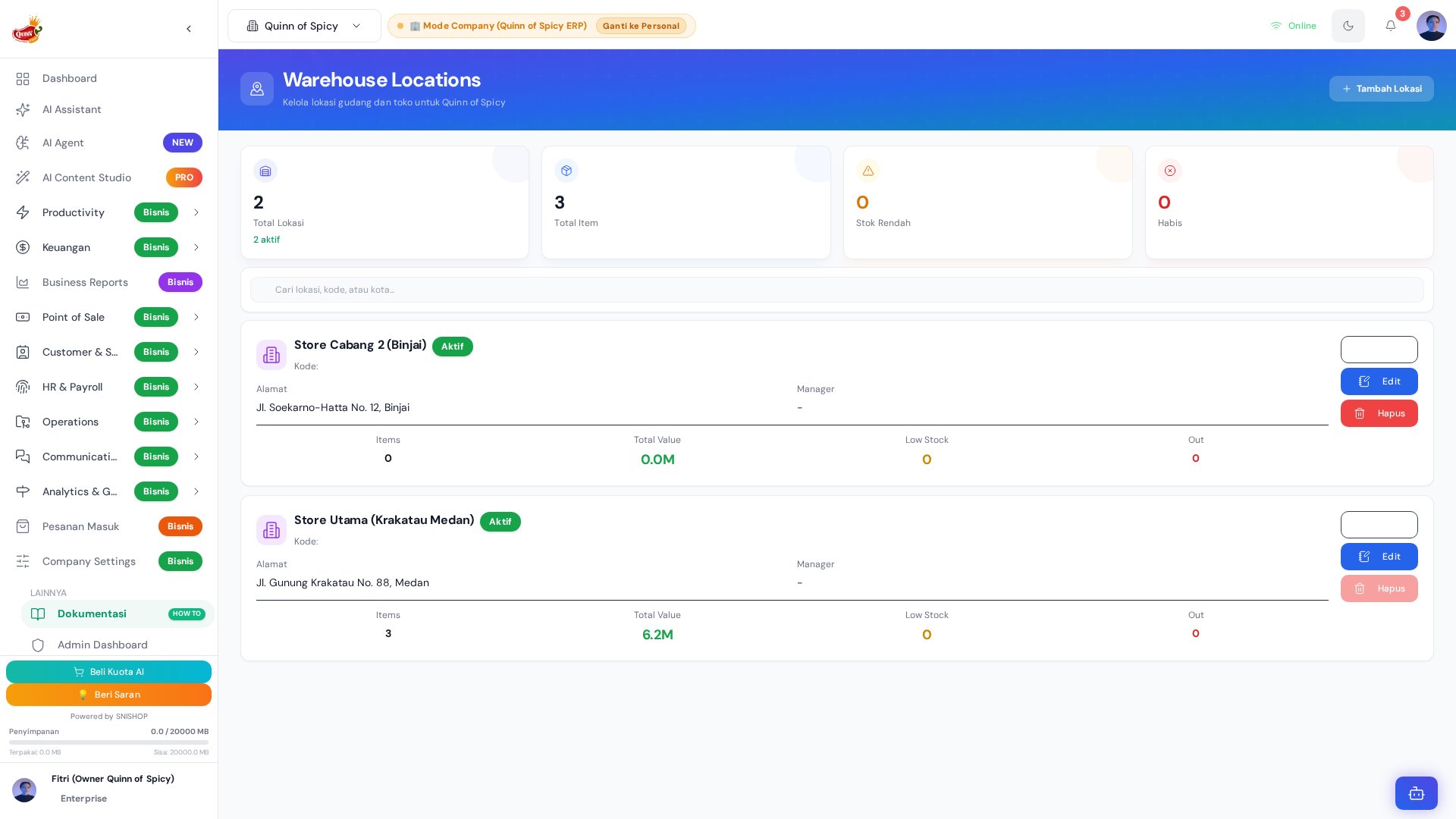 Warehouse Locations mengelola seluruh lokasi penyimpanan dalam hierarki yang terstruktur — dari gudang utama hingga zona-zona spesifik di dalam setiap gudang. Setiap lokasi memiliki kapasitas yang bisa diatur, status aktif/nonaktif, dan bisa di-assign ke outlet atau channel penjualan tertentu. Pengelolaan lokasi yang baik mempercepat pengambilan barang, mengurangi kesalahan pengiriman, dan memaksimalkan penggunaan ruang.
## Arsitektur Hierarki Lokasi
```mermaid theme={null}
graph TB
subgraph "Level 1: Gudang (Warehouse)"
W1[Gudang Utama
Warehouse Locations mengelola seluruh lokasi penyimpanan dalam hierarki yang terstruktur — dari gudang utama hingga zona-zona spesifik di dalam setiap gudang. Setiap lokasi memiliki kapasitas yang bisa diatur, status aktif/nonaktif, dan bisa di-assign ke outlet atau channel penjualan tertentu. Pengelolaan lokasi yang baik mempercepat pengambilan barang, mengurangi kesalahan pengiriman, dan memaksimalkan penggunaan ruang.
## Arsitektur Hierarki Lokasi
```mermaid theme={null}
graph TB
subgraph "Level 1: Gudang (Warehouse)"
W1[Gudang Utama
Jl. Produksi No. 1
Kapasitas: 5.000 unit]
W2[Toko Offline
Jl. Retail No. 5
Kapasitas: 500 unit]
W3[Gudang Reserve
Jl. Cadangan No. 3
Kapasitas: 3.000 unit]
end
subgraph "Level 2: Zona (Gudang Utama)"
Z1[Rak A — Bahan Baku Kering
1.000 unit]
Z2[Rak B — Bahan Baku Dingin
500 unit]
Z3[Rak C — Barang Jadi
2.000 unit]
Z4[Rak D — Kemasan
800 unit]
Z5[Zona WIP — Dalam Proses
700 unit]
end
subgraph "Level 2: Zona (Toko Offline)"
Z6[Display Shelf
200 unit]
Z7[Backroom
150 unit]
Z8[Cashier Stock
150 unit]
end
subgraph "Level 2: Zona (Gudang Reserve)"
Z9[Zona Safety Stock
1.500 unit]
Z10[Zona Overstock
1.500 unit]
end
W1 --> Z1 & Z2 & Z3 & Z4 & Z5
W2 --> Z6 & Z7 & Z8
W3 --> Z9 & Z10
```
## Entity Schema
### Warehouse (Level 1)
| Field | Tipe | Wajib | Deskripsi |
| - | - | - | - |
| `id` | UUID | Auto | Primary key |
| `name` | string | Ya | Nama gudang (contoh: Gudang Utama) |
| `address` | string | Ya | Alamat lengkap |
| `city` | string | Ya | Kota lokasi |
| `pic` | FK → Employee | Ya | Penanggung jawab gudang |
| `pic_phone` | string | Tidak | Nomor kontak di gudang |
| `operational_hours` | string | Tidak | Jam buka gudang (HH:MM - HH:MM) |
| `type` | enum | Ya | `warehouse`, `store`, `reserve`, `transit` |
| `status` | enum | Ya | `active`, `inactive` |
| `total_capacity` | number | Tidak | Total kapasitas dalam unit |
| `company_id` | FK → Company | Ya | Scope perusahaan |
### Zone (Level 2)
| Field | Tipe | Wajib | Deskripsi |
| - | - | - | - |
| `id` | UUID | Auto | Primary key |
| `name` | string | Ya | Nama zona (contoh: Rak A-1, Zona Pendingin) |
| `warehouse_id` | FK → Warehouse | Ya | Gudang induk |
| `capacity` | number | Tidak | Maksimum unit yang bisa ditampung |
| `storage_type` | enum | Tidak | `normal`, `cold_storage`, `frozen`, `hazardous` |
| `status` | enum | Ya | `active`, `full`, `inactive` |
| `assigned_outlet` | FK → Outlet | Tidak | Outlet/channel yang dilayani |
| `current_occupancy` | number | Auto | Jumlah unit saat ini |
## Warehouse Types
| Tipe | Ikon | Deskripsi | Contoh Penggunaan |
| - | - | - | - |
| `warehouse` | 🏭 | Gudang utama untuk produksi dan penyimpanan | Gudang bahan baku, gudang barang jadi |
| `store` | 🏪 | Toko offline / titik penjualan | Toko retail, counter |
| `reserve` | 📦 | Gudang cadangan untuk safety stock | Overstock, reserve bahan baku |
| `transit` | 🚚 | Lokasi sementara untuk transfer | Hub distribusi, staging area |
## Kapasitas & Status
### Monitoring Kapasitas
```mermaid theme={null}
flowchart TD
A[Zone: current_occupancy / capacity] --> B{Usage Percentage}
B -->|"< 50%"| C["🟢 Tersedia
Bisa menerima stok baru"]
B -->|"50-80%"| D["🟡 Mulai Penuh
Monitor, pertimbangkan redistribusi"]
B -->|"80-100%"| E["🔴 Penuh
Hentikan penerimaan"]
B -->|"> 100%"| F["⚫ Overcapacity
Segera redistribusi"]
B -->|"status = inactive"| G["⬜ Nonaktif
Tidak muncul sebagai opsi"]
```
| Status | Kapasitas Terpakai | Warna | Tindakan |
| - | - | - | - |
| **Tersedia** | \< 50% | 🟢 Hijau | Bisa menerima stok baru |
| **Mulai Penuh** | 50-80% | 🟡 Kuning | Monitor, pertimbangkan redistribusi |
| **Penuh** | 80-100% | 🔴 Merah | Hentikan penerimaan, transfer ke lokasi lain |
| **Overcapacity** | > 100% | ⚫ Abu-abu | Segera redistribusi, jangan terima stok baru |
| **Nonaktif** | - | ⬜ Abu-abu | Tidak muncul sebagai opsi penerimaan |
### Contoh Monitoring
| Lokasi | Kapasitas | Terisi | Terpakai | Status | Tindakan |
| - | - | - | - | - | - |
| Rak A — Bahan Baku Kering | 1.000 unit | 650 unit | 65% | 🟡 Mulai Penuh | Monitor |
| Rak B — Bahan Baku Dingin | 500 unit | 200 unit | 40% | 🟢 Tersedia | Terima stok |
| Rak C — Barang Jadi | 2.000 unit | 1.800 unit | 90% | 🔴 Penuh | Transfer ke Reserve |
| Rak D — Kemasan | 800 unit | 300 unit | 37% | 🟢 Tersedia | Terima stok |
| Display Shelf | 200 unit | 150 unit | 75% | 🟡 Mulai Penuh | Restock dari Backroom |
## Visualisasi Tata Letak
Sistem menyediakan visualisasi sederhana untuk membantu navigasi gudang:
```
┌─────────────────────────────────────────────┐
│ GUDANG UTAMA │
│ Jl. Produksi No. 1 │
│ PIC: Budi Santoso │
│ Kapasitas: 5.000 unit │
├─────────┬─────────┬─────────┬───────────────┤
│ Rak A │ Rak B │ Rak C │ Rak D │
│ Bahan │ Bahan │ Barang │ Kemasan │
│ Baku │ Baku │ Jadi │ │
│ Kering │ Dingin │ │ │
│ 65% 🟡 │ 40% 🟢 │ 90% 🔴 │ 37% 🟢 │
├─────────┴─────────┴─────────┴───────────────┤
│ Zona WIP (Dalam Proses) │
│ 55% 🟡 │
└─────────────────────────────────────────────┘
```
## Assign Lokasi ke Outlet
```mermaid theme={null}
flowchart LR
subgraph "Zona Assignment"
Z1[Display Shelf] --> O1[Toko Offline]
Z2[Cashier Stock] --> O2[Kasir 1]
Z2 --> O3[Kasir 2]
Z3[Backroom] --> O1
Z4[Rak C — Barang Jadi] --> O4[Semua Outlet]
end
subgraph "POS Transaction"
O1 --> T1[Sistem ambil stok
dari Display Shelf]
T1 --> T2{Stok cukup?}
T2 -->|Ya| T3[Proses transaksi]
T2 -->|Tidak| T4[Ambil dari Backroom]
end
```
Setiap zona bisa di-assign ke outlet atau channel penjualan tertentu:
| Zona | Assign ke | Fungsi | Fallback |
| - | - | - | - |
| Display Shelf | Toko Offline | Stok etalase toko | Backroom |
| Cashier Stock | Kasir 1, Kasir 2 | Stok di meja kasir | Display Shelf |
| Backroom | Toko Offline | Stok cadangan di belakang toko | — |
| Rak C — Barang Jadi | Semua outlet | Sumber transfer ke toko | Gudang Reserve |
Saat transaksi POS, sistem otomatis mengambil stok dari lokasi yang di-assign ke outlet tersebut.
## Stock Resolution Flow
```mermaid theme={null}
sequenceDiagram
participant POS as POS Transaction
participant WL as Warehouse Locations
participant SM as Stock Management
participant INV as Inventory
POS->>WL: Get assigned location for outlet
WL-->>POS: Location ID (e.g., Display Shelf)
POS->>SM: Check stock at location
SM->>INV: Query inventory by location_id
INV-->>SM: Available quantity
SM-->>POS: Stock available
alt Stock sufficient
POS->>SM: Deduct stock from location
SM->>INV: Update quantity
else Stock insufficient
POS->>WL: Get fallback location
WL-->>POS: Fallback (e.g., Backroom)
POS->>SM: Check fallback stock
SM-->>POS: Fallback stock available
POS->>SM: Deduct from fallback
end
```
## Setup & Konfigurasi
### Tambah Gudang Baru
```mermaid theme={null}
flowchart LR
A[Klik Tambah Gudang] --> B[Isi Data Gudang
nama, alamat, kota, PIC]
B --> C[Tentukan Tipe
warehouse/store/reserve/transit]
C --> D[Set Jam Operasional]
D --> E[Simpan]
E --> F[Gudang Siap
Tambah Zona]
```
### Tambah Zona di Dalam Gudang
1. Buka detail gudang
2. Klik **Tambah Zona**
3. Isi nama zona, kapasitas, tipe penyimpanan
4. Assign ke outlet (jika perlu)
5. Simpan
### Nonaktifkan Lokasi
1. Buka detail zona
2. Ubah status menjadi **Nonaktif**
3. Lokasi tidak akan muncul sebagai opsi saat penerimaan barang
4. Stok yang masih ada harus dipindahkan terlebih dahulu
### Hapus Lokasi
> **Warning**: Lokasi hanya bisa dihapus jika:
>
> * Stok di lokasi tersebut = 0
> * Tidak ada transaksi yang menggunakan lokasi ini
> * Tidak ada pending transfer yang melibatkan lokasi ini
## Integrasi dengan Modul Lain
| Modul | Integrasi | Detail | Data Flow |
| - | - | - | - |
| **Stock Management** | Stok per lokasi | Setiap lokasi memiliki stok terpisah | Location → Stock (per-location qty) |
| **POS** | Lokasi penjualan | Kasir mengambil stok dari lokasi yang di-assign | Outlet → Location → Stock deduction |
| **Manufacturing** | Lokasi produksi | Produksi selalu di Gudang Utama → Zona WIP | WIP Zone → Production |
| **Stock Transfer** | Transfer antar lokasi | Dari lokasi asal ke lokasi tujuan | Source Location → Target Location |
| **Stock Opname** | Opname per lokasi | Hitung fisik per zona/gudang | Physical Count → Location adjustment |
## Cara Akses
Dari sidebar, klik menu **Inventory** > **Warehouse Locations**.
## Tips
* **Beri nama lokasi yang intuitif dan konsisten** — gunakan format huruf untuk zona dan angka untuk rak (contoh: Rak A-1, Rak A-2, Rak B-1)
* **Audit lokasi secara berkala** — pastikan semua lokasi masih relevan dan kapasitasnya sesuai kebutuhan aktual
* **Manfaatkan assign lokasi** untuk mengontrol dari mana kasir mengambil stok, supaya tidak terjadi konflik antar outlet
* **Monitor kapasitas secara proaktif** — jangan tunggu sampai overcapacity, redistribusi saat status mulai kuning
* **Cold storage dan frozen zone** perlu monitoring suhu tambahan — pastikan tipe penyimpanan sesuai dengan karakteristik produk
* **Gunakan gudang transit** untuk optimasi distribusi ke outlet yang jauh, mengurangi waktu pengiriman
***
## Entity Relationship Diagram
```mermaid theme={null}
erDiagram
WarehouseLocation ||--o{ StockTransfer : "from_location / to_location"
WarehouseLocation ||--o{ StockMovement : "location_id"
WarehouseLocation ||--o{ StockOpname : "warehouse_id"
WarehouseLocation ||--o{ StockAlert : "location_id"
WarehouseLocation ||--o{ CompanyPOSInventory : "company_id (scope)"
StockTransfer }o--|| CompanyPOSProduct : "product_id"
StockMovement }o--|| CompanyPOSInventory : "inventory_id"
StockOpname }o--|| WarehouseLocation : "warehouse_id"
WarehouseLocation {
string id PK
string company_id FK
string location_name
string location_code UK
string location_type "warehouse|store|transit|virtual"
string address
string city
string manager_name
string manager_contact
number capacity
number current_utilization
boolean is_active
object coordinates
}
StockTransfer {
string id PK
string company_id FK
string transfer_number UK
string from_location_id FK
string to_location_id FK
string product_id FK
string lot_id FK
number quantity_sent
number quantity_received
number discrepancy_quantity
string transfer_mode "in_transit|direct"
string status "draft|in_transit|completed|cancelled"
number unit_cost
number total_value
string cost_status
}
StockMovement {
string id PK
string company_id FK
string inventory_id FK
string product_id FK
string location_id FK
string movement_type "in|out|transfer|adjustment|return|damaged|hold|hold_release"
number quantity
number stock_before
number stock_after
string reference_type
string lot_id FK
string from_location_id FK
string to_location_id FK
number unit_cost
number total_value
}
StockOpname {
string id PK
string company_id FK
string warehouse_id FK
string opname_number UK
date opname_date
string status "draft|in_progress|counting|submitted|pending_approval|completed|approved|posted|rejected"
string conducted_by_user_id
string approved_by
number total_variance_items
number total_variance_value
boolean adjustment_posted
}
StockAlert {
string id PK
string company_id FK
string location_id FK
string product_id FK
string alert_type "low_stock|out_of_stock|overstock|expiring_soon|reconciliation_needed|negative_stock|rapid_depletion|orphaned_movement|duplicate_movement|futuristic_date|lot_negative"
number current_quantity
number threshold_quantity
string severity "low|medium|high|critical"
string status "active|acknowledged|dismissed|resolved"
}
CompanyPOSInventory {
string id PK
string company_id FK
string product_id FK
string product_name
string type "in|out|adjustment"
number quantity
number stock_before
number stock_after
string reason
string reference_id
string performed_by
}
```
## Tabel Schema Detail Entitas Lokasi
### WarehouseLocation — Entitas Utama Lokasi Gudang
| Field | Tipe | Wajib | Default | Deskripsi |
| - | - | - | - | - |
| `id` | UUID | Auto | — | Primary key |
| `company_id` | string (FK → Company) | Ya | — | ID perusahaan (multi-tenant) |
| `location_name` | string | Ya | — | Nama lokasi (Gudang Utama, Toko Cabang A, dll) |
| `location_code` | string | Ya | — | Kode unik lokasi |
| `location_type` | enum | Tidak | `warehouse` | Tipe lokasi: `warehouse`, `store`, `transit`, `virtual` |
| `description` | string (max 1000) | Tidak | — | Penjelasan mengenai lokasi gudang, kapasitas, dan jenis barang yang disimpan |
| `address` | string | Tidak | — | Alamat lengkap lokasi |
| `city` | string | Tidak | — | Kota lokasi |
| `manager_name` | string | Tidak | — | Nama penanggung jawab gudang |
| `manager_contact` | string | Tidak | — | Kontak penanggung jawab (telepon/email) |
| `capacity` | number | Tidak | — | Kapasitas maksimal (unit atau m2) |
| `current_utilization` | number | Tidak | `0` | Utilisasi saat ini (%) |
| `is_active` | boolean | Tidak | `true` | Status aktif/nonaktif lokasi |
| `coordinates` | object | Tidak | — | Koordinat GPS (`latitude`, `longitude`) |
### StockTransfer — Referensi Lokasi pada Transfer Stok
| Field | Tipe | Wajib | Default | Deskripsi |
| - | - | - | - | - |
| `id` | UUID | Auto | — | Primary key |
| `company_id` | string (FK → Company) | Ya | — | ID perusahaan (multi-tenant) |
| `transfer_number` | string | Tidak | — | Nomor dokumen transfer unik (TRF-YYYYMMDD-XXXX) |
| `from_location_id` | string (FK → WarehouseLocation) | Ya | — | ID lokasi gudang/toko asal |
| `from_location_name` | string | Tidak | — | Nama lokasi asal (denormalized) |
| `to_location_id` | string (FK → WarehouseLocation) | Ya | — | ID lokasi gudang/toko tujuan |
| `to_location_name` | string | Tidak | — | Nama lokasi tujuan (denormalized) |
| `product_id` | string (FK → CompanyPOSProduct) | Ya | — | ID produk yang ditransfer |
| `lot_id` | string | Tidak | — | ID lot/batch asal untuk traceability |
| `lot_number` | string | Tidak | — | Nomor label lot batch fisik |
| `quantity_sent` | number | Ya | — | Kuantitas yang dikirim dari lokasi asal |
| `quantity_received` | number | Tidak | `0` | Kuantitas riil yang diterima di lokasi tujuan |
| `discrepancy_quantity` | number | Tidak | `0` | Selisih kuantitas (quantity\_sent − quantity\_received) |
| `discrepancy_reason` | string | Tidak | — | Alasan selisih jika barang rusak/hilang di jalan |
| `transfer_mode` | enum | Tidak | `in_transit` | Mode transfer: `in_transit` (2-tahap) atau `direct` (instan) |
| `status` | enum | Tidak | `in_transit` | Status siklus hidup: `draft`, `in_transit`, `completed`, `cancelled` |
| `unit_cost` | number | Tidak | `0` | Harga modal/HPP per unit produk |
| `total_value` | number | Tidak | `0` | Nilai total transfer (quantity\_sent × unit\_cost) |
| `transfer_date` | string (date) | Tidak | — | Tanggal transfer (YYYY-MM-DD) |
| `shipped_at` | datetime | Tidak | — | Waktu pengiriman berangkat |
| `shipped_by` | string | Tidak | — | Email/identitas petugas yang mengirim |
| `received_at` | datetime | Tidak | — | Waktu barang diterima di tujuan |
| `received_by` | string | Tidak | — | Email/identitas petugas yang menerima |
| `cost_status` | enum | Tidak | `complete` | Status kelengkapan biaya: `complete`, `provisional_zero_cost`, `unassigned` |
### StockMovement — Pergerakan Stok per Lokasi
| Field | Tipe | Wajib | Default | Deskripsi |
| - | - | - | - | - |
| `id` | UUID | Auto | — | Primary key |
| `company_id` | string (FK → Company) | Ya | — | ID perusahaan |
| `inventory_id` | string (FK → CompanyPOSInventory) | Ya | — | ID inventory yang berubah |
| `product_id` | string (FK → CompanyPOSProduct) | Tidak | — | ID produk |
| `location_id` | string (FK → WarehouseLocation) | Tidak | — | ID lokasi tempat stok bergerak |
| `location_name` | string | Tidak | — | Nama lokasi (denormalized) |
| `movement_type` | enum | Ya | — | Tipe pergerakan: `in`, `out`, `transfer`, `adjustment`, `return`, `damaged`, `hold`, `hold_release` |
| `quantity` | number | Ya | — | Jumlah perubahan |
| `stock_before` | number | Tidak | — | Stok sebelum pergerakan |
| `stock_after` | number | Tidak | — | Stok setelah pergerakan |
| `reference_type` | enum | Tidak | — | Sumber perubahan: `purchase`, `sale`, `cashier_sale`, `production`, `transfer`, `adjustment`, `opname_adjustment`, `return`, `manual`, `distribution_shipment`, `quality_hold` |
| `lot_id` | string | Tidak | — | ID Lot/Batch terkait untuk traceability |
| `from_location_id` | string (FK → WarehouseLocation) | Tidak | — | Dari lokasi (untuk transfer) |
| `to_location_id` | string (FK → WarehouseLocation) | Tidak | — | Ke lokasi (untuk transfer) |
| `unit_cost` | number | Tidak | `0` | Harga modal per unit saat transaksi |
| `total_value` | number | Tidak | `0` | quantity × unit\_cost (nilai modal) |
| `performed_by` | string | Tidak | — | Email user yang melakukan |
| `idempotency_key` | string | Tidak | — | Retry identity for an authoritative stock command |
### StockOpname — Opname Stok per Gudang
| Field | Tipe | Wajib | Default | Deskripsi |
| - | - | - | - | - |
| `id` | UUID | Auto | — | Primary key |
| `company_id` | string (FK → Company) | Ya | — | ID perusahaan |
| `warehouse_id` | string (FK → WarehouseLocation) | Tidak | — | Reference to WarehouseLocation |
| `warehouse_name` | string | Tidak | — | Nama gudang (denormalized) |
| `opname_number` | string | Tidak | — | Nomor sesi opname |
| `opname_date` | date | Ya | — | Tanggal pelaksanaan opname |
| `status` | enum | Tidak | `draft` | Status: `draft`, `in_progress`, `counting`, `submitted`, `pending_approval`, `completed`, `approved`, `posted`, `rejected` |
| `conducted_by_user_id` | string | Ya | — | ID user yang melaksanakan |
| `approved_by` | string | Tidak | — | Email/ID approver yang menyetujui |
| `total_variance_items` | number | Tidak | `0` | Jumlah item yang selisih |
| `total_variance_value` | number | Tidak | `0` | Total nilai rupiah selisih HPP |
| `adjustment_posted` | boolean | Tidak | `false` | Apakah penyesuaian sudah di-posting |
### StockAlert — Alert Stok per Lokasi
| Field | Tipe | Wajib | Default | Deskripsi |
| - | - | - | - | - |
| `id` | UUID | Auto | — | Primary key |
| `company_id` | string (FK → Company) | Ya | — | ID perusahaan |
| `location_id` | string (FK → WarehouseLocation) | Tidak | — | ID lokasi terkait |
| `location_name` | string | Tidak | — | Nama lokasi (denormalized) |
| `product_id` | string (FK → CompanyPOSProduct) | Tidak | — | ID produk terkait |
| `alert_type` | enum | Ya | — | Tipe alert: `low_stock`, `out_of_stock`, `overstock`, `expiring_soon`, `reconciliation_needed`, `negative_stock`, `rapid_depletion`, `orphaned_movement`, `duplicate_movement`, `futuristic_date`, `lot_negative` |
| `current_quantity` | number | Tidak | — | Kuantitas stok saat ini |
| `threshold_quantity` | number | Tidak | — | Kuantitas ambang batas |
| `severity` | enum | Tidak | `medium` | Tingkat keparahan: `low`, `medium`, `high`, `critical` |
| `status` | enum | Tidak | `active` | Status alert: `active`, `acknowledged`, `dismissed`, `resolved` |
| `fingerprint` | string | Tidak | — | Key stabil per anomali untuk mencegah notifikasi duplikat |
## State Machine — Siklus Hidup Status Lokasi
```mermaid theme={null}
stateDiagram-v2
[*] --> Aktif: Buat lokasi baru
(is_active = true)
state "Aktif (is_active = true)" as Aktif {
[*] --> Tersedia
Tersedia --> MulaiPenuh: Utilisasi ≥ 50%
MulaiPenuh --> Penuh: Utilisasi ≥ 80%
Penuh --> Overcapacity: Utilisasi > 100%
Overcapacity --> Penuh: Redistribusi stok
(utilisasi < 100%)
Penuh --> MulaiPenuh: Transfer keluar
(utilisasi < 80%)
MulaiPenuh --> Tersedia: Transfer keluar
(utilisasi < 50%)
}
Aktif --> Nonaktif: Nonaktifkan lokasi
(is_active = false)
Nonaktif --> Aktif: Aktifkan kembali
(is_active = true)
state "Nonaktif (is_active = false)" as Nonaktif {
[*] --> Diblokir
Diblokir: Tidak muncul sebagai
opsi penerimaan stok
}
state "Tersedia" as Tersedia
state "Mulai Penuh" as MulaiPenuh
state "Penuh" as Penuh
state "Overcapacity" as Overcapacity
```
### Aturan Transisi Status
| Dari | Ke | Kondisi | Aksi Sistem |
| - | - | - | - |
| `[*]` | **Aktif — Tersedia** | Lokasi baru dibuat dengan `is_active = true`, `current_utilization = 0` | Lokasi siap menerima stok |
| Tersedia | **Mulai Penuh** | `current_utilization` mencapai 50% | Notifikasi monitoring aktif |
| Mulai Penuh | **Penuh** | `current_utilization` mencapai 80% | Peringatan merah, hentikan penerimaan |
| Penuh | **Overcapacity** | `current_utilization` melebihi 100% | Alert critical, wajib redistribusi segera |
| Overcapacity | **Penuh** | Redistribusi menurunkan utilisasi \< 100% | Status turun, masih perlu monitoring |
| Penuh | **Mulai Penuh** | Transfer keluar menurunkan utilisasi \< 80% | Status kuning, pantau berkala |
| Mulai Penuh | **Tersedia** | Transfer keluar menurunkan utilisasi \< 50% | Status hijau, bisa terima stok baru |
| Aktif (semua sub-status) | **Nonaktif** | Admin menonaktifkan `is_active = false` | Lokasi tidak muncul sebagai opsi; stok existing harus dipindahkan |
| Nonaktif | **Aktif — Tersedia** | Admin mengaktifkan kembali `is_active = true` | Lokasi kembali tersedia setelah verifikasi kapasitas |
## Sequence Diagram — Pembuatan Gudang Baru
```mermaid theme={null}
sequenceDiagram
participant Admin as Admin Gudang
participant UI as Frontend
participant API as Backend API
participant DB as Database
participant Audit as Audit Log
Admin->>UI: Klik "Tambah Gudang"
UI->>API: GET /api/warehouse-locations/form-config
API-->>UI: Return form config (tipe, field opsional)
Admin->>UI: Isi form: nama, kode, alamat, kota,
PIC, tipe, kapasitas, koordinat
UI->>UI: Validasi client-side
(location_code unik, capacity > 0)
Admin->>UI: Klik "Simpan"
UI->>API: POST /api/warehouse-locations
{location_name, location_code, location_type,
address, city, manager_name, manager_contact,
capacity, coordinates}
API->>API: Validasi server-side
API->>DB: Cek uniqueness location_code
dalam scope company_id
DB-->>API: Tidak ada duplikat
API->>DB: INSERT INTO warehouse_locations
(is_active = true, current_utilization = 0)
DB-->>API: Return created record
API->>Audit: Log pembuatan lokasi baru
API-->>UI: 201 Created + warehouse object
UI-->>Admin: Toast "Gudang berhasil ditambahkan"
UI->>UI: Redirect ke halaman detail gudang
(siap tambah zona)
```
## Sequence Diagram — Assignment Zona ke Outlet
```mermaid theme={null}
sequenceDiagram
participant Admin as Admin Gudang
participant UI as Frontend
participant API as Backend API
participant DB as Database
participant POS as POS Module
Admin->>UI: Buka detail gudang
UI->>API: GET /api/warehouse-locations/:id/zones
API->>DB: SELECT zones WHERE warehouse_id = :id
DB-->>API: List zona
API-->>UI: Return zones[]
Admin->>UI: Klik "Assign Zona ke Outlet"
UI->>API: GET /api/outlets?company_id=:cid
API-->>UI: Return available outlets[]
Admin->>UI: Pilih zona + target outlet + fallback
Admin->>UI: Klik "Simpan Assignment"
UI->>API: PATCH /api/warehouse-locations/zones/:zoneId
{assigned_outlet, fallback_location}
API->>DB: UPDATE zone SET assigned_outlet, fallback
DB-->>API: Updated
API->>POS: Invalidate cache outlet → location mapping
POS->>POS: Reload mapping
API-->>UI: 200 OK
UI-->>Admin: Toast "Zona berhasil di-assign ke outlet"
Note over POS: Transaksi POS berikutnya
akan menggunakan zona baru
untuk outlet tersebut
```
## Sequence Diagram — Transfer Stok Antar Lokasi
```mermaid theme={null}
sequenceDiagram
participant User as Petugas Gudang
participant UI as Frontend
participant API as Backend API
participant DB as Database
participant Src as Lokasi Asal
participant Dst as Lokasi Tujuan
User->>UI: Buat transfer baru
UI->>API: POST /api/stock-transfers
{from_location_id, to_location_id,
product_id, quantity_sent, transfer_mode}
API->>DB: INSERT stock_transfer (status = 'draft')
DB-->>API: Transfer created
User->>UI: Konfirmasi & kirim
UI->>API: PATCH /api/stock-transfers/:id
{status: 'in_transit', shipped_at, shipped_by}
API->>DB: UPDATE status = 'in_transit'
API->>Src: StockMovement (type = 'transfer',
from_location_id, quantity = -qty)
Src->>DB: Deduct stok di lokasi asal
alt transfer_mode = 'direct'
API->>Dst: StockMovement (type = 'transfer',
to_location_id, quantity = +qty)
Dst->>DB: Add stok di lokasi tujuan
API->>DB: UPDATE status = 'completed',
received_at, received_by
else transfer_mode = 'in_transit'
Note over API: Barang dalam perjalanan
User->>UI: Konfirmasi penerimaan di tujuan
UI->>API: PATCH /api/stock-transfers/:id
{status: 'completed', quantity_received,
received_at, received_by}
API->>Dst: StockMovement (type = 'transfer',
to_location_id, quantity = +qty_received)
Dst->>DB: Add stok di lokasi tujuan
opt Ada selisih
API->>DB: SET discrepancy_quantity,
discrepancy_reason
API->>DB: INSERT StockAlert
(type = 'reconciliation_needed')
end
end
API-->>UI: Transfer completed
UI-->>User: Toast "Transfer berhasil diselesaikan"
```
## Tabel Enum — Tipe & Konfigurasi Lokasi
### `location_type` — Tipe Lokasi Gudang
| Nilai | Ikon | Deskripsi | Contoh Penggunaan |
| - | - | - | - |
| `warehouse` | 🏭 | Gudang utama untuk produksi dan penyimpanan | Gudang bahan baku, gudang barang jadi |
| `store` | 🏪 | Toko offline / titik penjualan | Toko retail, counter |
| `transit` | 🚚 | Lokasi sementara untuk transfer antar gudang | Hub distribusi, staging area |
| `virtual` | 👻 | Lokasi virtual untuk penyesuaian stok | Virtual warehouse untuk koreksi, write-off |
### `warehouse_zone` — Tipe Zona dalam Gudang
| Nilai | Deskripsi | Syarat Khusus | Contoh |
| - | - | - | - |
| `racking` | Zona rak standar untuk penyimpanan umum | Suhu ruang, ventilasi cukup | Rak A — Bahan Baku Kering |
| `cold_storage` | Zona pendingin untuk produk segar | Suhu 2–8°C, monitoring berkala | Rak B — Bahan Baku Dingin |
| `frozen` | Zona beku untuk produk frozen | Suhu ≤ −18°C, alarm suhu | Freezer — Ice Cream |
| `wip` | Zona work-in-progress (barang dalam proses) | Dekat lini produksi | Zona WIP — Dalam Proses |
| `display` | Zona etalase / display untuk toko | Penataan visual, mudah diakses | Display Shelf |
| `backroom` | Zona penyimpanan cadangan di belakang toko | Akses terbatas, stok buffer | Backroom |
| `safety_stock` | Zona safety stock / reserve | Tidak boleh diambil tanpa approval | Zona Safety Stock |
| `quarantine` | Zona karantina untuk barang menunggu QC | Terpisah dari stok aktif, label khusus | Zona Karantina QC |
### `storage_condition` — Kondisi Penyimpanan
| Kondisi | Rentang Suhu | Kelembapan | Produk yang Cocok | Monitoring |
| - | - | - | - | - |
| `ambient` | 20–30°C | 40–60% | Bahan baku kering, kemasan | Harian |
| `cool` | 8–15°C | 50–70% | Cokelat, beberapa jenis bumbu | Setiap 4 jam |
| `cold` | 2–8°C | 60–80% | Susu, daging segar, sayuran | Setiap 2 jam |
| `frozen` | ≤ −18°C | 30–50% | Ice cream, frozen food, daging beku | Setiap 1 jam + alarm |
| `controlled` | Custom per produk | Custom per produk | Produk sensitif (enzim, kultur) | Continuous + IoT sensor |
### `movement_type` — Tipe Pergerakan Stok (StockMovement)
| Nilai | Deskripsi | Pengaruh Stok | Referensi |
| - | - | - | - |
| `in` | Stok masuk (pembelian, produksi) | + quantity | Purchase Order, Production |
| `out` | Stok keluar (penjualan, pemakaian) | − quantity | Sales Order, Raw Material Outbound |
| `transfer` | Transfer antar lokasi | − di asal, + di tujuan | Stock Transfer |
| `adjustment` | Penyesuaian stok (koreksi) | +/− quantity | Manual Adjustment |
| `return` | Retur barang masuk | + quantity | Return Order |
| `damaged` | Barang rusak / write-off | − quantity | Damage Report |
| `hold` | Blokir lot untuk QC (informatif) | Tidak berubah | Quality Check |
| `hold_release` | Lepas blokir lot setelah QC lolos | Tidak berubah | QC Release |
### `transfer_mode` — Mode Transfer Stok
| Nilai | Deskripsi | Alur | Penggunaan |
| - | - | - | - |
| `in_transit` | Transfer 2-tahap melalui fase transit | Draft → In Transit → Completed | Antar gudang berbeda kota, butuh tracking pengiriman |
| `direct` | Transfer instan langsung selesai | Draft → Completed (langsung) | Antar zona dalam gudang yang sama, restok cepat |
### `transfer_status` — Status Siklus Transfer
| Status | Deskripsi | Stok Asal | Stok Tujuan | Aksi Selanjutnya |
| - | - | - | - | - |
| `draft` | Transfer belum dikirim | Tidak berubah | Tidak berubah | Kirim atau batalkan |
| `in_transit` | Barang dalam perjalanan | Sudah dikurangi | Belum bertambah | Konfirmasi penerimaan |
| `completed` | Transfer selesai | Sudah dikurangi | Sudah ditambah | Selesai |
| `cancelled` | Transfer dibatalkan | Tidak berubah (di-reverse) | Tidak berubah | Selesai |
### `cost_status` — Status Kelengkapan Biaya Transfer
| Status | Deskripsi | Tindakan |
| - | - | - |
| `complete` | HPP/unit cost sudah tersedia | Tidak ada aksi |
| `provisional_zero_cost` | Unit cost belum tersedia, sementara = 0 | Update saat HPP dihitung |
| `unassigned` | Belum ada informasi biaya | Perlu input manual |
### `alert_type` — Tipe Alert Stok (StockAlert)
| Nilai | Deskripsi | Severity Default | Tindakan yang Disarankan |
| - | - | - | - |
| `low_stock` | Stok di bawah threshold minimum | `medium` | Reorder / transfer dari gudang lain |
| `out_of_stock` | Stok = 0 | `high` | Segera reorder atau alihkan ke outlet lain |
| `overstock` | Stok melebihi kapasitas lokasi | `low` | Redistribusi ke lokasi lain |
| `expiring_soon` | Produk mendekati tanggal kedaluwarsa | `high` | Gunakan terlebih dahulu (FEFO) |
| `reconciliation_needed` | Selisih antara stok sistem dan fisik | `high` | Lakukan stock opname |
| `negative_stock` | Stok bernilai negatif (anomali) | `critical` | Investigasi segera, koreksi stok |
| `rapid_depletion` | Penurunan stok tidak wajar | `high` | Cek transaksi terkait, kemungkinan fraud |
| `orphaned_movement` | Pergerakan stok tanpa referensi valid | `medium` | Review dan link ke referensi yang benar |
| `duplicate_movement` | Pergerakan stok terdeteksi duplikat | `medium` | Verifikasi dan hapus duplikat |
| `futuristic_date` | Tanggal transaksi di masa depan | `medium` | Koreksi tanggal transaksi |
| `lot_negative` | Lot/batch memiliki stok negatif | `critical` | Investigasi traceability lot |
## RBAC — Hak Akses Modul Warehouse Locations
| Role | Lihat Daftar | Lihat Detail | Buat Gudang | Edit Gudang | Hapus Gudang | Tambah Zona | Assign Zona | Transfer Stok | Nonaktifkan | Lihat Alert |
| - | :-: | :-: | :-: | :-: | :-: | :-: | :-: | :-: | :-: | :-: |
| **Super Admin** | ✅ | ✅ | ✅ | ✅ | ✅ | ✅ | ✅ | ✅ | ✅ | ✅ |
| **Admin Gudang** | ✅ | ✅ | ✅ | ✅ | ❌ | ✅ | ✅ | ✅ | ✅ | ✅ |
| **Kepala Gudang** | ✅ | ✅ | ❌ | ✅ | ❌ | ✅ | ✅ | ✅ | ❌ | ✅ |
| **Petugas Gudang** | ✅ | ✅ | ❌ | ❌ | ❌ | ❌ | ❌ | ✅ | ❌ | ✅ |
| **Admin POS** | ✅ | ✅ | ❌ | ❌ | ❌ | ❌ | ✅ | ❌ | ❌ | ✅ |
| **Kasir** | ✅ | ❌ | ❌ | ❌ | ❌ | ❌ | ❌ | ❌ | ❌ | ❌ |
| **Viewer / Auditor** | ✅ | ✅ | ❌ | ❌ | ❌ | ❌ | ❌ | ❌ | ❌ | ✅ |
### Catatan RBAC
| Aturan | Detail |
| - | - |
| **Scope multi-tenant** | Semua query difilter berdasarkan `company_id` dari session user |
| **Row-Level Security (RLS)** | Diterapkan pada semua entitas lokasi — user hanya melihat data dalam company-nya |
| **Hapus gudang** | Hanya Super Admin; memerlukan semua zona kosong (stok = 0) dan tidak ada transaksi aktif |
| **Nonaktifkan lokasi** | Minimal Kepala Gudang; stok existing harus dipindahkan terlebih dahulu |
| **Transfer stok** | Petugas Gudang bisa membuat dan mengirim, Kepala Gudang bisa approve penerimaan |
| **Assign zona ke outlet** | Admin Gudang dan Admin POS memiliki akses untuk mengontrol aliran stok ke outlet |
| **Audit trail** | Semua operasi CRUD dan transfer dicatat di audit log dengan `performed_by` |
This documentation is built and hosted on [Mintlify](https://mintlify.com), a developer documentation platform.