> ## Documentation Index
> Fetch the complete documentation index at: https://docs.quinnsambal.com/llms.txt
> Use this file to discover all available pages before exploring further.

# Pos reports

<style>
  {`
    [class*="max-w-none"][class*="table"] {
      display: block !important;
      overflow-x: auto !important;
      max-width: 100% !important;
      width: 100% !important;
      flex-grow: 0 !important;
    }
    [class*="max-w-none"][class*="table"] > table {
      width: 100% !important;
      max-width: 100% !important;
      table-layout: fixed !important;
    }
    .mermaid {
      max-width: 100% !important;
      overflow-x: auto !important;
    }
    article svg[role="img"] {
      max-width: 100% !important;
      height: auto !important;
    }
    article img, .prose img {
      max-width: 100% !important;
      height: auto !important;
    }
    img[src*="LOGO"], img[src*="logo"] {
      max-width: 120px !important;
      max-height: 40px !important;
      width: auto !important;
      height: auto !important;
      object-fit: contain !important;
    }
    `}
</style>

***

title: "POS Reports"
description: "Pusat laporan POS — 10 jenis laporan (per\_item, per\_category, per\_brand, per\_customer, per\_cashier, per\_location, per\_payment, per\_hour, daily\_summary, profit\_analysis) dengan export Excel/PDF."
--------------------------------------------------------------------------------------------------------------------------------------------------------------------------------------------------------------------------

# POS Reports
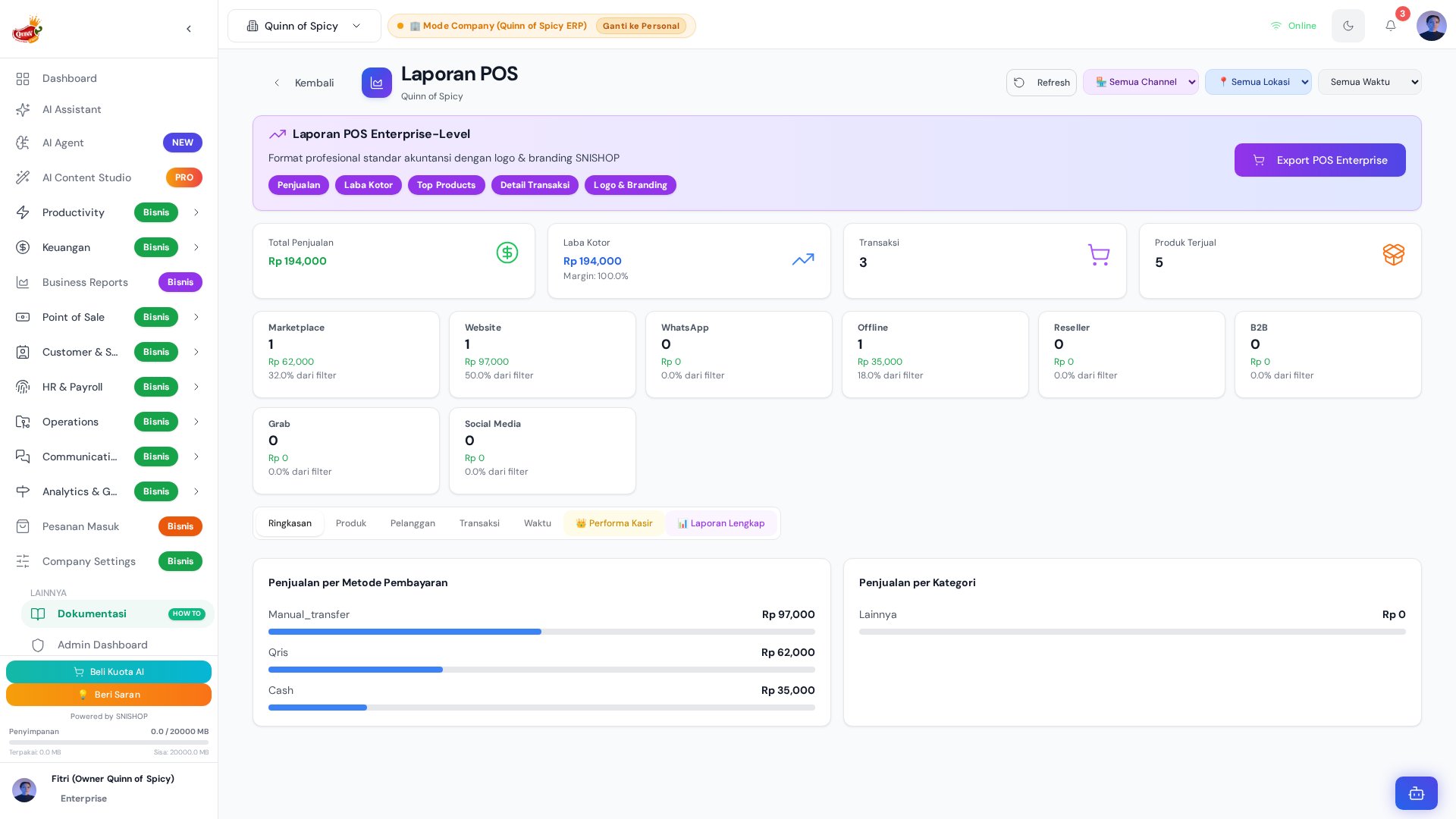
<img src="https://mintcdn.com/quinnofspicy/e4f_upKhVWcjsUmM/docs/mintlify/screenshots/pos/pos-reports.png?fit=max&auto=format&n=e4f_upKhVWcjsUmM&q=85&s=fc77248a83ed91bcf3435978aa0a622b" alt="POS Reports" width="1920" height="1080" data-path="docs/mintlify/screenshots/pos/pos-reports.png" />

**POS Reports** (`POSReports.jsx` — **2.061 baris**) adalah pusat analitik dan pelaporan untuk seluruh aktivitas POS. Komponen ini menghasilkan **10 jenis laporan** berbeda yang mencakup setiap dimensi bisnis — dari per-item hingga profit analysis — dengan filter multi-dimensional, grafik interaktif, dan export ke Excel/PDF/CSV.

Semua data diambil dari `CompanyPOSTransaction` yang sudah terintegrasi dengan inventory, finance, dan CRM, sehingga laporan POS bukan hanya angka penjualan mentah melainkan sudah mencakup HPP, margin, dan kontribusi pelanggan.

## Arsitektur Laporan

```mermaid theme={null}
graph TB
    subgraph "POSReports.jsx — 2.061 lines"
        TAB1[Tab: Per Item]
        TAB2[Tab: Per Category]
        TAB3[Tab: Per Brand]
        TAB4[Tab: Per Customer]
        TAB5[Tab: Per Kasir]
        TAB6[Tab: Per Location]
        TAB7[Tab: Per Payment]
        TAB8[Tab: Per Hour]
        TAB9[Tab: Daily Summary]
        TAB10[Tab: Profit Analysis]
    end

    subgraph "Data Source"
        T[CompanyPOSTransaction<br/>50+ fields]
        TI[Transaction Items<br/>unit_cost snapshot]
        M[POSMember<br/>loyalty data]
    end

    subgraph "Output"
        E1[Excel .xlsx]
        E2[PDF]
        E3[CSV]
        E4[Charts<br/>Recharts]
    end

    T & TI & M --> TAB1 & TAB2 & TAB3 & TAB4 & TAB5 & TAB6 & TAB7 & TAB8 & TAB9 & TAB10
    TAB1 & TAB2 & TAB3 & TAB4 & TAB5 & TAB6 & TAB7 & TAB8 & TAB9 & TAB10 --> E1 & E2 & E3 & E4
```

## 10 Jenis Laporan

| # | Report Type | Group By | Metrik Utama | Use Case |
| - | - | - | - | - |
| 1 | **per\_item** | Product SKU | qty\_sold, revenue, avg\_price | Produk terlaris |
| 2 | **per\_category** | Category | total\_revenue, transaction\_count | Kategori paling profitable |
| 3 | **per\_brand** | Brand | revenue, market\_share % | Analisis brand performance |
| 4 | **per\_customer** | Customer/Members | total\_spent, visit\_count, avg\_order | Top customers & loyalty |
| 5 | **per\_cashier** | Kasir/User | transactions, revenue, avg\_order | Performance per kasir |
| 6 | **per\_location** | Location/Outlet | revenue, transactions, top\_product | Perbandingan outlet |
| 7 | **per\_payment** | Payment Method | count, total, percentage | Distribusi metode bayar |
| 8 | **per\_hour** | Hour of Day | transactions, revenue | Peak hours analysis |
| 9 | **daily\_summary** | Date | revenue, transactions, avg\_order, refund | Tren harian |
| 10 | **profit\_analysis** | Product/Category | revenue, COGS, gross\_margin % | Profitability deep-dive |

## Komponen Laporan

### 1. Ringkasan Penjualan

| Metrik | Deskripsi | Sumber Data |
| - | - | - |
| **Total Omzet** | Total pendapatan dalam periode | `SUM(transaction.total_amount)` |
| **Jumlah Transaksi** | Total transaksi yang terjadi | `COUNT(transaction.id)` |
| **Average Order Value** | Rata-rata nilai per transaksi | `AVG(transaction.total_amount)` |
| **Refund** | Total refund yang diproses | `SUM(voided_transaction.total_amount)` |
| **Net Revenue** | Omzet - Refund | Calculated |
| **Gross Margin** | Revenue - HPP | `SUM(item.price - item.unit_cost)` |

### 2. Grafik Tren

| Grafik | Tipe | Deskripsi | Library |
| - | - | - | - |
| **Penjualan Harian** | Line chart | Tren revenue per hari | Recharts `<LineChart>` |
| **Penjualan per Jam** | Bar chart | Distribusi transaksi per jam | Recharts `<BarChart>` |
| **Per Channel** | Pie chart | Proporsi penjualan per channel | Recharts `<PieChart>` |
| **Per Metode Pembayaran** | Donut chart | Distribusi metode pembayaran | Recharts `<PieChart>` |
| **Top 10 Products** | Horizontal bar | Produk dengan revenue tertinggi | Recharts `<BarChart>` |
| **Profit Margin Trend** | Area chart | Margin % per hari | Recharts `<AreaChart>` |

### 3. Top Products

| Rank | Informasi | Metrik |
| - | - | - |
| **Produk** | Nama produk + SKU | — |
| **Qty Terjual** | Jumlah unit terjual | `SUM(item.quantity)` |
| **Revenue** | Total pendapatan dari produk | `SUM(item.subtotal)` |
| **COGS** | Harga pokok (dari snapshot) | `SUM(item.unit_cost × item.quantity)` |
| **Margin** | Revenue - COGS | Calculated |
| **Persentase** | Kontribusi terhadap total revenue | `revenue / total_revenue × 100` |

### 4. Shift Report

| Metrik | Deskripsi | Sumber |
| - | - | - |
| **Kasir** | Nama kasir yang bertugas | `transaction.cashier_id` |
| **Shift** | Waktu mulai dan selesai shift | `transaction.created_at` grouping |
| **Transaksi** | Jumlah transaksi yang diproses | `COUNT(*)` |
| **Total Penjualan** | Total omzet shift | `SUM(total_amount)` |
| **Cash** | Total pembayaran tunai | `WHERE payment_method = 'cash'` |
| **Non-Cash** | Total pembayaran non-tunai | `WHERE payment_method != 'cash'` |
| **Expected Cash** | Uang yang seharusnya ada di laci | `opening_balance + cash_sales` |
| **Variance** | Selisih expected vs actual | `actual_cash - expected_cash` |

### 5. Profit Analysis

```mermaid theme={null}
flowchart LR
    A[Transaction Items] --> B[Extract unit_cost<br/>COGS snapshot]
    B --> C[Calculate per item:<br/>margin = price - unit_cost]
    C --> D[Group by category/brand]
    D --> E[Revenue - COGS = Gross Profit]
    E --> F[Margin % = Profit / Revenue × 100]
    F --> G[Sort by margin %]
    G --> H[Identify high/low margin products]
```

| Metrik Profit | Formula | Insight |
| - | - | - |
| **Gross Profit** | `SUM(price - unit_cost) × qty` | Profit sebelum overhead |
| **Gross Margin %** | `gross_profit / revenue × 100` | Efisiensi pricing |
| **COGS Ratio** | `total_cogs / revenue × 100` | Proporsi HPP terhadap revenue |
| **Revenue per Item** | `total_revenue / total_items` | Rata-rata revenue per item |
| **Profit per Transaction** | `gross_profit / transaction_count` | Rata-rata profit per transaksi |

### 6. Rekap Metode Pembayaran

| Metode | Count | Total | Persentase |
| - | - | - | - |
| **Cash** | XX | Rp XXX | XX% |
| **QRIS** | XX | Rp XXX | XX% |
| **Transfer** | XX | Rp XXX | XX% |
| **Debit** | XX | Rp XXX | XX% |
| **E-Wallet** | XX | Rp XXX | XX% |
| **Split Payment** | XX | Rp XXX | XX% |

## Filter Laporan

| Filter | Opsi | Deskripsi |
| - | - | - |
| **Outlet** | Semua outlet, atau pilih outlet spesifik | Filter per lokasi |
| **Periode** | Hari ini, Kemarin, Minggu ini, Bulan ini, Custom | Date range picker |
| **Kasir** | Semua kasir, atau pilih kasir spesifik | Filter per user |
| **Channel** | Semua channel, atau pilih channel spesifik | 8 channel tersedia |
| **Kategori** | Semua kategori produk | Filter per kategori |
| **Brand** | Semua brand | Filter per brand |
| **Payment Method** | Semua metode, atau pilih metode spesifik | Filter per payment |

## Export

| Format | Kegunaan | Library |
| - | - | - |
| **Excel (.xlsx)** | Analisis lebih lanjut dengan pivot table | SheetJS / xlsx |
| **PDF** | Presentasi ke manajemen, arsip | jsPDF / html2canvas |
| **CSV** | Import ke sistem akuntansi | Native CSV generator |

## Cara Akses

| Metode | Detail |
| - | - |
| **URL** | `/pos/pos-reports` |
| **Sidebar** | Menu **POS** → **Reports** |

## Flow Penggunaan

```mermaid theme={null}
flowchart TD
    A[Buka POS Reports] --> B[Lihat ringkasan hari ini]
    B --> C{Pilih jenis laporan}
    C -->|Per Item| D[Top produk terlaris]
    C -->|Per Category| E[Revenue per kategori]
    C -->|Per Customer| F[Customer spending]
    C -->|Per Kasir| G[Performance kasir]
    C -->|Per Location| H[Perbandingan outlet]
    C -->|Per Payment| I[Distribusi pembayaran]
    C -->|Per Hour| J[Peak hours]
    C -->|Daily Summary| K[Tren harian]
    C -->|Profit Analysis| L[Margin & COGS]

    D & E & F & G & H & I & J & K & L --> M[Atur filter & periode]
    M --> N[Lihat grafik & tabel]
    N --> O{Butuh export?}
    O -->|Ya| P[Klik Export → Excel/PDF/CSV]
    O -->|Tidak| Q[Selesai]
```

## COGS & Profit Tracking

Laporan profit menggunakan **unit\_cost snapshot** dari `CompanyPOSTransaction.items[]` — bukan harga beli terkini. Ini memastikan margin yang dihitung mencerminkan HPP pada saat transaksi terjadi, bukan HPP saat laporan dibuat.

| Aspek | Implementasi |
| - | - |
| **Snapshot Timing** | Saat transaksi di-finalize |
| **Source** | `CompanyPOSInventory.avg_cost` (FIFO weighted) |
| **Storage** | `transaction_item.unit_cost` |
| **Accuracy** | Mencerminkan HPP aktual saat penjualan |
| **Finance Sync** | HPP total → transfer ke reserve fund via jurnal GL |

## Tips

* **Gunakan shift report** setiap akhir shift untuk mencocokkan uang tunai di laci kasir dengan total penjualan yang tercatat
* **Laporan profit analysis** adalah yang paling penting untuk keputusan pricing — identifikasi produk dengan margin \< 30% dan pertimbangkan penyesuaian harga
* **Export ke Excel** untuk analisis mendalam dengan pivot table dan chart kustom
* **Bandingkan performa antar kasir** menggunakan shift report untuk mengidentifikasi training needs
* **Monitor peak hours** dari laporan per\_hour untuk mengatur jadwal shift yang optimal
* **Review laporan per\_customer** bersama tim CRM untuk mengidentifikasi pelanggan yang perlu di-reengage

***

## Entity Relationship Diagram — Report Entities

```mermaid theme={null}
erDiagram
    CompanyPOSTransaction {
        string company_id PK
        string location_id FK
        string transaction_number UK
        string invoice_number
        date_time transaction_date
        number subtotal
        number discount_amount
        number tax_amount
        number total
        number total_amount
        string payment_method
        string payment_status
        string sales_channel
        string source
        string status
        string cashier_id
        string customer_id
        number points_earned
        number points_used
    }

    FinancialRecord {
        string user_id FK
        string company_id FK
        string account_id FK
        string type
        number amount
        string category
        string description
        date_time date
        string source
        string mode
        string reference_id
        string reference_type
        number cogs_amount
        number tax_amount
        number channel_fee
        string idempotency_key
    }

    FinancialReportSnapshot {
        string company_id FK
        string report_type
        string report_name
        date start_date
        date end_date
        string generated_by_user_id FK
        date_time generated_date
        object report_data
        string template_id FK
        string notes
    }

    Account {
        string user_id FK
        string company_id FK
        string name
        string type
        string account_number
        string bank_name
        number initial_balance
        number current_balance
        string currency
        boolean is_active
        boolean is_default_pos
        string mode
    }

    ReportTemplate {
        string company_id FK
        string user_id FK
        string report_name
        string report_type
        string data_source
        array columns
        array filters
        array group_by
        object date_range
        boolean is_public
    }

    CompanyPOSTransaction ||--o{ FinancialRecord : "pos_transaction → reference_id"
    CompanyPOSTransaction }o--|| Account : "payment → account"
    FinancialRecord }o--|| Account : "account_id"
    FinancialReportSnapshot }o--|| ReportTemplate : "template_id"
    FinancialReportSnapshot }o--|| CompanyPOSTransaction : "agregasi data laporan"
    ReportTemplate }o--|| CompanyPOSTransaction : "data_source query"
```

## Tabel Schema — Entitas Laporan

### CompanyPOSTransaction — Field untuk Reporting

| Field | Tipe | Deskripsi | Digunakan di Laporan |
| - | - | - | - |
| `company_id` | `string` | ID perusahaan (multi-tenant) | Filter multi-outlet |
| `location_id` | `string` | ID lokasi toko/gudang | Report: per\_location |
| `location_name` | `string` | Nama lokasi (denormalized) | Display label |
| `transaction_number` | `string` | Nomor transaksi unik (UK) | Referensi silang |
| `invoice_number` | `string` | Nomor invoice cetak | Receipt & PDF export |
| `transaction_date` | `date-time` | Tanggal & waktu transaksi | Filter periode, grouping harian/jam |
| `items` | `array<object>` | Daftar item yang dibeli | Report: per\_item, per\_category, per\_brand, profit\_analysis |
| `items[].product_id` | `string` | ID produk | Join ke master produk |
| `items[].product_name` | `string` | Nama produk (snapshot) | Display & grouping |
| `items[].sku` | `string` | Stock Keeping Unit | Identifikasi produk |
| `items[].quantity` | `number` | Jumlah unit dibeli | Agregasi qty terjual |
| `items[].price` | `number` | Harga jual satuan | Kalkulasi revenue |
| `items[].discount` | `number` | Diskon per-baris | Kalkulasi net revenue |
| `items[].subtotal` | `number` | Subtotal per-baris | Revenue per item |
| `items[].unit_cost` | `number` | HPP snapshot saat transaksi | COGS & profit analysis |
| `items[].total_cost` | `number` | Total HPP baris (`unit_cost × qty`) | COGS agregat |
| `subtotal` | `number` | Subtotal sebelum diskon & pajak | Ringkasan omzet |
| `discount_amount` | `number` | Total diskon (nominal) | Kalkulasi net revenue |
| `discount_percentage` | `number` | Persentase diskon | Kalkulasi diskon |
| `tax_amount` | `number` | PPN transaksi | Laporan pajak |
| `total` / `total_amount` | `number` | Total akhir transaksi | Metrik utama semua laporan |
| `payment_method` | `enum` | Metode pembayaran (cash, card, transfer, ewallet, qris, dll.) | Report: per\_payment |
| `payment_status` | `enum` | Status pembayaran (pending, paid, refunded, dll.) | Filter transaksi valid |
| `payments` | `array<object>` | Detail split payment (multi-tender) | Report: per\_payment (detail) |
| `customer_id` | `string` | ID member pelanggan | Report: per\_customer |
| `customer_name` | `string` | Nama pelanggan | Display label |
| `cashier_id` | `string` | ID kasir yang melayani | Report: per\_cashier |
| `cashier_name` | `string` | Nama kasir (denormalized) | Display label |
| `source` | `enum` | Sumber transaksi (pos, online\_catalog, marketplace, dll.) | Report: per\_channel |
| `sales_channel` | `enum` | Channel penjualan ternormalisasi | Report: per\_channel (canonical) |
| `status` | `enum` | Status transaksi (completed, refunded, cancelled, dll.) | Filter validitas |
| `points_earned` | `number` | Poin loyalitas didapat | Integrasi CRM report |
| `points_used` | `number` | Poin loyalitas dipakai | Integrasi CRM report |

### FinancialReportSnapshot — Schema Lengkap

| Field | Tipe | Wajib | Deskripsi |
| - | - | - | - |
| `company_id` | `string` | Ya | ID perusahaan pemilik laporan |
| `report_type` | `enum` | Ya | Jenis laporan: `profit_loss`, `balance_sheet`, `cash_flow`, `budget_vs_actual`, `trial_balance`, `custom` |
| `report_name` | `string` | Ya | Nama laporan yang di-generate |
| `start_date` | `date` | Ya | Tanggal awal periode laporan |
| `end_date` | `date` | Ya | Tanggal akhir periode laporan |
| `generated_by_user_id` | `string` | Ya | ID user yang men-generate laporan |
| `generated_date` | `date-time` | Ya | Timestamp waktu laporan dibuat |
| `report_data` | `object` | Ya | JSON berisi data hasil agregasi laporan |
| `template_id` | `string` | Tidak | ID ReportTemplate yang digunakan (jika ada) |
| `notes` | `string` | Tidak | Catatan tambahan pada snapshot |

### FinancialRecord — Schema Lengkap

| Field | Tipe | Wajib | Deskripsi |
| - | - | - | - |
| `user_id` | `string` | Ya | ID pengguna yang mencatat |
| `company_id` | `string` | Tidak | ID perusahaan (null untuk personal) |
| `account_id` | `string` | Tidak | ID rekening/kantong sumber dana |
| `type` | `enum` | Ya | Jenis: `income`, `expense`, `transfer` |
| `amount` | `number` | Ya | Nominal transaksi |
| `category` | `string` | Tidak | Kategori transaksi |
| `description` | `string` | Tidak | Deskripsi singkat |
| `date` | `date-time` | Ya | Tanggal transaksi |
| `attachment_url` | `string` | Tidak | URL bukti transaksi |
| `source` | `enum` | Tidak | Sumber: `manual`, `ai_text`, `ai_scan`, `pos`, `manufacturing`, `distribution`, `recall`, `stock_opname` |
| `mode` | `enum` | Tidak | Mode: `personal` atau `business` |
| `reference_id` | `string` | Tidak | ID referensi ke entitas sumber (invoice, POS transaction, expense) |
| `reference_type` | `enum` | Tidak | Tipe referensi: `pos_transaction`, `invoice_payment`, `expense`, `transfer`, dll. |
| `cogs_amount` | `number` | Tidak | HPP/COGS yang dibekukan saat transaksi POS — digunakan P\&L untuk laba kotor |
| `tax_amount` | `number` | Tidak | Pajak (PPN keluaran) yang termasuk dalam amount |
| `channel_fee` | `number` | Tidak | Potongan biaya marketplace/platform |
| `idempotency_key` | `string` | Tidak | Kunci idempoten untuk mencegah duplikasi |

### Account — Schema Lengkap

| Field | Tipe | Wajib | Deskripsi |
| - | - | - | - |
| `user_id` | `string` | Ya | ID pemilik rekening |
| `company_id` | `string` | Tidak | ID perusahaan (null untuk personal) |
| `name` | `string` | Ya | Nama rekening (mis: Kas, BCA, Mandiri, Dompet) |
| `type` | `enum` | Ya | Jenis: `cash`, `bank`, `e-wallet`, `other` |
| `account_number` | `string` | Tidak | Nomor rekening |
| `bank_name` | `string` | Tidak | Nama bank (untuk type=bank) |
| `initial_balance` | `number` | Tidak | Saldo awal (default: 0) |
| `current_balance` | `number` | Tidak | Saldo terkini (dikelola server; diupdate oleh POS sales, invoice payment, expense, void) |
| `currency` | `string` | Tidak | Mata uang (default: IDR) |
| `is_active` | `boolean` | Tidak | Status aktif rekening (default: true) |
| `is_default_pos` | `boolean` | Tidak | Rekening default untuk kasir POS (default: false) |
| `mode` | `enum` | Tidak | Mode: `personal` atau `business` |

## State Machine — Siklus Hidup Pembuatan Laporan

```mermaid theme={null}
stateDiagram-v2
    [*] --> Idle : Tidak ada laporan aktif

    Idle --> Filtering : User memilih jenis laporan & periode
    Filtering --> Querying : Filter divalidasi, query dibangun
    Querying --> Aggregating : Data mentah diambil dari CompanyPOSTransaction
    Aggregating --> Computing : Data dikelompokkan sesuai report_type
    Computing --> Rendering : Metrik & grafik dihitung (margin, COGS, tren)
    Rendering --> ExportReady : Laporan ditampilkan di UI (Recharts)
    ExportReady --> Exporting : User klik Export (Excel/PDF/CSV)
    ExportReady --> Snapshotting : User simpan snapshot → FinancialReportSnapshot
    Exporting --> Idle : File download selesai
    Snapshotting --> Idle : Snapshot tersimpan di DB

    Filtering --> Idle : User batal / reset filter
    Querying --> Idle : Tidak ada data ditemukan
    Aggregating --> Idle : Error pada query

    state Exporting {
        [*] --> GenerateFile
        GenerateFile --> ExcelExport : format = .xlsx
        GenerateFile --> PDFExport : format = .pdf
        GenerateFile --> CSVExport : format = .csv
        ExcelExport --> [*]
        PDFExport --> [*]
        CSVExport --> [*]
    }

    state Snapshotting {
        [*] --> CollectParams
        CollectParams --> BuildReportData : Kumpulkan parameter (periode, filter, grup)
        BuildReportData --> InsertSnapshot : report_data = JSON agregat
        InsertSnapshot --> PersistDB : INSERT INTO FinancialReportSnapshot
        PersistDB --> [*]
    }
```

## Sequence Diagram — Pembuatan Laporan Harian

```mermaid theme={null}
sequenceDiagram
    autonumber
    actor Manager as Manager / Owner
    participant UI as POSReports.jsx
    participant API as Backend API
    participant DB as Database
    participant FIN as FinancialRecord

    Manager->>UI: Buka halaman POS Reports
    UI->>API: GET /api/pos-transactions?period=today&company_id=xxx
    API->>DB: SELECT * FROM CompanyPOSTransaction WHERE transaction_date >= today AND company_id = xxx AND status = 'completed'
    DB-->>API: Return transaksi hari ini
    API->>FIN: JOIN FinancialRecord WHERE reference_type = 'pos_transaction' AND date >= today
    FIN-->>API: Return data keuangan terkait (COGS, tax)
    API-->>UI: Return payload lengkap (transaksi + items + COGS + financial)

    Note over UI: Rendering 10 tab laporan secara paralel

    UI->>UI: Tab per_item → GROUP BY product_id, SUM(qty, revenue, margin)
    UI->>UI: Tab per_category → GROUP BY category, SUM(revenue, count)
    UI->>UI: Tab per_brand → GROUP BY brand, CALCULATE market_share %
    UI->>UI: Tab per_customer → GROUP BY customer_id, SUM(spent, visits)
    UI->>UI: Tab per_cashier → GROUP BY cashier_id, SUM(transactions, revenue)
    UI->>UI: Tab per_location → GROUP BY location_id, SUM(revenue, transactions)
    UI->>UI: Tab per_payment → GROUP BY payment_method, COUNT, SUM, %
    UI->>UI: Tab per_hour → GROUP BY HOUR(transaction_date), COUNT, SUM
    UI->>UI: Tab daily_summary → GROUP BY DATE(transaction_date), SUM, AVG
    UI->>UI: Tab profit_analysis → SUM(revenue - COGS), CALCULATE margin %

    UI-->>Manager: Tampilkan ringkasan + grafik + tabel
```

## Sequence Diagram — Shift Closeout (Tutup Kasir)

```mermaid theme={null}
sequenceDiagram
    autonumber
    actor Kasir as Kasir
    participant UI as POSReports.jsx
    participant API as Backend API
    participant DB as Database
    participant ACC as Account

    Kasir->>UI: Klik "Tutup Shift" di akhir shift
    UI->>API: GET /api/pos-transactions?cashier_id=xxx&shift=today
    API->>DB: SELECT * FROM CompanyPOSTransaction WHERE cashier_id = xxx AND transaction_date BETWEEN shift_start AND shift_end AND status = 'completed'
    DB-->>API: Return semua transaksi shift kasir

    API->>API: Hitung metrik shift:
    Note over API: total_transaksi = COUNT(*)<br/>total_penjualan = SUM(total_amount)<br/>cash_sales = SUM WHERE payment_method = 'cash'<br/>non_cash_sales = SUM WHERE payment_method != 'cash'<br/>refund = SUM WHERE status = 'refunded'

    API->>ACC: SELECT current_balance FROM Account WHERE is_default_pos = true
    ACC-->>API: Return saldo kas terakhir

    API->>API: expected_cash = opening_balance + cash_sales - refund
    API-->>UI: Return shift report (metrik + expected vs actual)

    UI-->>Kasir: Tampilkan shift report + variance
    Kasir->>Kasir: Hitung uang fisik di laci
    Kasir->>UI: Input actual_cash (uang fisik)
    UI->>UI: variance = actual_cash - expected_cash

    alt variance = 0
        UI-->>Kasir: Shift balanced ✓
    else variance != 0
        UI-->>Kasir: Selisih terdeteksi — perlu penjelasan
        Kasir->>UI: Input catatan selisih
    end

    UI->>API: POST /api/shift-closeout { cashier_id, shift_data, variance, notes }
    API->>DB: INSERT FinancialReportSnapshot (report_type = 'custom', report_data = shift_report)
    DB-->>API: Snapshot tersimpan
    API-->>UI: Shift berhasil ditutup
    UI-->>Kasir: Konfirmasi tutup shift
```

## Sequence Diagram — Agregasi Penjualan ke Laporan Keuangan

```mermaid theme={null}
sequenceDiagram
    autonumber
    participant POS as POS Transaction
    participant API as Backend API
    participant DB as CompanyPOSTransaction
    participant FIN as FinancialRecord
    participant ACC as Account
    participant SNAP as FinancialReportSnapshot

    Note over POS: Transaksi POS di-finalize oleh kasir

    POS->>API: POST /api/pos-transactions/finalize { items, total, payment }
    API->>DB: INSERT CompanyPOSTransaction (status = 'completed')
    DB-->>API: Transaction created

    API->>API: Hitung COGS dari items[].unit_cost × items[].quantity
    API->>FIN: INSERT FinancialRecord { type: 'income', amount: total, cogs_amount: total_cogs, tax_amount: ppn, reference_type: 'pos_transaction', reference_id: transaction_id, source: 'pos' }
    FIN-->>API: FinancialRecord created

    API->>ACC: UPDATE Account SET current_balance = current_balance + total WHERE account_id = payment_account
    ACC-->>API: Balance updated

    Note over SNAP: Laporan di-generate berkala (harian/mingguan/bulanan)

    SNAP->>API: GET /api/reports/generate { report_type: 'profit_loss', period: 'this_month' }
    API->>DB: SELECT SUM(total_amount), COUNT(*) FROM CompanyPOSTransaction WHERE transaction_date BETWEEN start AND end
    DB-->>API: Return aggregated sales data
    API->>FIN: SELECT SUM(amount) as revenue, SUM(cogs_amount) as total_cogs, SUM(tax_amount) as total_tax FROM FinancialRecord WHERE type = 'income' AND source = 'pos' AND date BETWEEN start AND end
    FIN-->>API: Return financial aggregates

    API->>API: gross_profit = revenue - total_cogs<br/>gross_margin_pct = (gross_profit / revenue) × 100<br/>net_revenue = revenue - total_tax

    API->>SNAP: INSERT FinancialReportSnapshot { report_type: 'profit_loss', report_data: { revenue, cogs, gross_profit, margin_pct, ... }, generated_date: now() }
    SNAP-->>API: Snapshot tersimpan
    API-->>POS: Laporan profit_loss siap ditampilkan
```

## Enum Tables — Nilai yang Diizinkan

### `report_type` (FinancialReportSnapshot)

| Nilai | Deskripsi |
| - | - |
| `profit_loss` | Laporan laba rugi — revenue, COGS, gross profit, net income |
| `balance_sheet` | Neraca keuangan — aset, liabilitas, ekuitas |
| `cash_flow` | Arus kas — masuk, keluar, saldo |
| `budget_vs_actual` | Perbandingan anggaran vs realisasi |
| `trial_balance` | Neraca saldo — daftar semua akun dan saldonya |
| `custom` | Laporan kustom (shift report, laporan khusus, dll.) |

### `period_type` (ReportTemplate.date\_range)

| Nilai | Deskripsi |
| - | - |
| `custom` | Rentang tanggal kustom (start\_date — end\_date) |
| `last_7_days` | 7 hari terakhir dari hari ini |
| `last_30_days` | 30 hari terakhir dari hari ini |
| `this_month` | Bulan berjalan (tanggal 1 s/d akhir bulan) |
| `this_quarter` | Kuartal berjalan |
| `this_year` | Tahun berjalan (1 Januari s/d 31 Desember) |

### `sales_channel` (CompanyPOSTransaction)

| Nilai | Deskripsi | Digunakan di Laporan |
| - | - | - |
| `offline_pos` | Transaksi langsung di kasir (default POS) | per\_location, daily\_summary |
| `offline` | Penjualan offline non-POS | per\_location |
| `website` | Pesanan via website perusahaan | per\_channel |
| `online_catalog` | Katalog online (digital lookbook) | per\_channel |
| `marketplace` | Tokopedia, Shopee, TikTok Shop, dll. | per\_channel |
| `landing_page` | Pesanan via landing page | per\_channel |
| `whatsapp` | Pesanan via WhatsApp Business | per\_channel |
| `reseller` | Pesanan via reseller/dropshipper | per\_channel |
| `b2b` | Penjualan bisnis-ke-bisnis | per\_channel |
| `grab` | Pesanan via GrabFood/GrabMart | per\_channel |
| `social_media` | Pesanan via Instagram, Facebook, dll. | per\_channel |

### `payment_method` (CompanyPOSTransaction)

| Nilai | Deskripsi |
| - | - |
| `cash` | Pembayaran tunai di kasir |
| `card` | Kartu kredit/debit |
| `transfer` | Transfer bank manual |
| `ewallet` | GoPay, OVO, DANA, ShopeePay, dll. |
| `qris` | Pembayaran via QRIS |
| `saldo` | Bayar pakai saldo member/loyalty |
| `mayar` | via Mayar payment gateway |
| `debt` | Hutang / tempo |
| `manual_transfer` | Transfer manual (dengan verifikasi) |
| `midtrans` | via Midtrans payment gateway |
| `tripay` | via Tripay payment gateway |
| `stripe` | via Stripe payment gateway |
| `paypal` | via PayPal |

### `payment_status` (CompanyPOSTransaction)

| Nilai | Deskripsi |
| - | - |
| `pending` | Menunggu pembayaran |
| `pending_verification` | Pembayaran dikirim, menunggu verifikasi |
| `partially_paid` | Baru dibayar sebagian (split payment) |
| `paid` | Lunas / terbayar penuh |
| `failed` | Pembayaran gagal |
| `refunded` | Dana dikembalikan ke pelanggan |
| `rejected` | Pembayaran ditolak |

### `type` (FinancialRecord)

| Nilai | Deskripsi |
| - | - |
| `income` | Pemasukan (penjualan POS, invoice, dll.) |
| `expense` | Pengeluaran (operasional, bahan baku, dll.) |
| `transfer` | Transfer antar rekening/kantong |

### `source` (FinancialRecord)

| Nilai | Deskripsi |
| - | - |
| `manual` | Dicatat manual oleh user |
| `ai_text` | Dicatat via AI text input |
| `ai_scan` | Dicatat via AI scan struk |
| `pos` | Otomatis dari transaksi POS |
| `manufacturing` | Dari modul manufaktur/produksi |
| `distribution` | Dari modul distribusi |
| `recall` | Dari proses recall produk |
| `stock_opname` | Dari stock opname |

### `reference_type` (FinancialRecord)

| Nilai | Deskripsi |
| - | - |
| `pos_transaction` | Referensi ke CompanyPOSTransaction |
| `invoice_payment` | Referensi ke Invoice |
| `expense` | Referensi ke Expense |
| `manual` | Tidak ada referensi otomatis |
| `transfer` | Referensi ke transfer antar akun |
| `production_order` | Referensi ke production order |
| `distribution_shipment` | Referensi ke pengiriman distribusi |
| `distribution_return` | Referensi ke retur distribusi |
| `batch_recall` | Referensi ke batch recall |
| `stock_opname` | Referensi ke stock opname |

### `type` (Account)

| Nilai | Deskripsi |
| - | - |
| `cash` | Kas / uang tunai |
| `bank` | Rekening bank (BCA, Mandiri, BNI, dll.) |
| `e-wallet` | Dompet digital (GoPay, OVO, DANA) |
| `other` | Lainnya (piutang, kantong virtual, dll.) |

## RBAC — Hak Akses Laporan POS

| Role | Lihat Laporan | Export Laporan | Generate Snapshot | Hapus Snapshot | Kelola Template |
| - | :-: | :-: | :-: | :-: | :-: |
| **Super Admin** | ✅ | ✅ | ✅ | ✅ | ✅ |
| **Admin** | ✅ | ✅ | ✅ | ✅ | ✅ |
| **Manager / Owner** | ✅ | ✅ | ✅ | ❌ | ✅ |
| **Supervisor** | ✅ | ✅ | ✅ | ❌ | ❌ |
| **Kasir** | ✅ (shift sendiri) | ✅ (shift sendiri) | ❌ | ❌ | ❌ |
| **Staff / Viewer** | ✅ (read-only) | ❌ | ❌ | ❌ | ❌ |

### Aturan RLS (Row-Level Security)

| Operasi | Kondisi |
| - | - |
| **Create** | `company_id` = `user.active_company_id` DAN `company_id` tidak null/empty, ATAU `created_by_id` = `user.id`, ATAU `user.role` = `admin` |
| **Read** | `company_id` = `user.active_company_id` DAN `company_id` tidak null/empty, ATAU `created_by_id` = `user.id`, ATAU `user.role` = `admin` |
| **Update** | `company_id` = `user.active_company_id` DAN `company_id` tidak null/empty, ATAU `created_by_id` = `user.id`, ATAU `user.role` = `admin` |
| **Delete** | `company_id` = `user.active_company_id` DAN `company_id` tidak null/empty, ATAU `created_by_id` = `user.id`, ATAU `user.role` = `admin` |

> **Catatan:** RLS berlaku identik untuk keempat operasi (CRUD) pada entitas `CompanyPOSTransaction`, `FinancialRecord`, dan `Account`. Entitas `FinancialReportSnapshot` dan `ReportTemplate` menggunakan RLS kosong (default: semua role terautentikasi memiliki akses penuh dalam scope company).


This documentation is built and hosted on [Mintlify](https://mintlify.com), a developer documentation platform.