
title: “Automation” description: “Workflow automation dengan 12 trigger types, 7 action types, background engine, dan integrasi Google Sheets/Slack/Discord di SNISHOP ERP.”
Automation
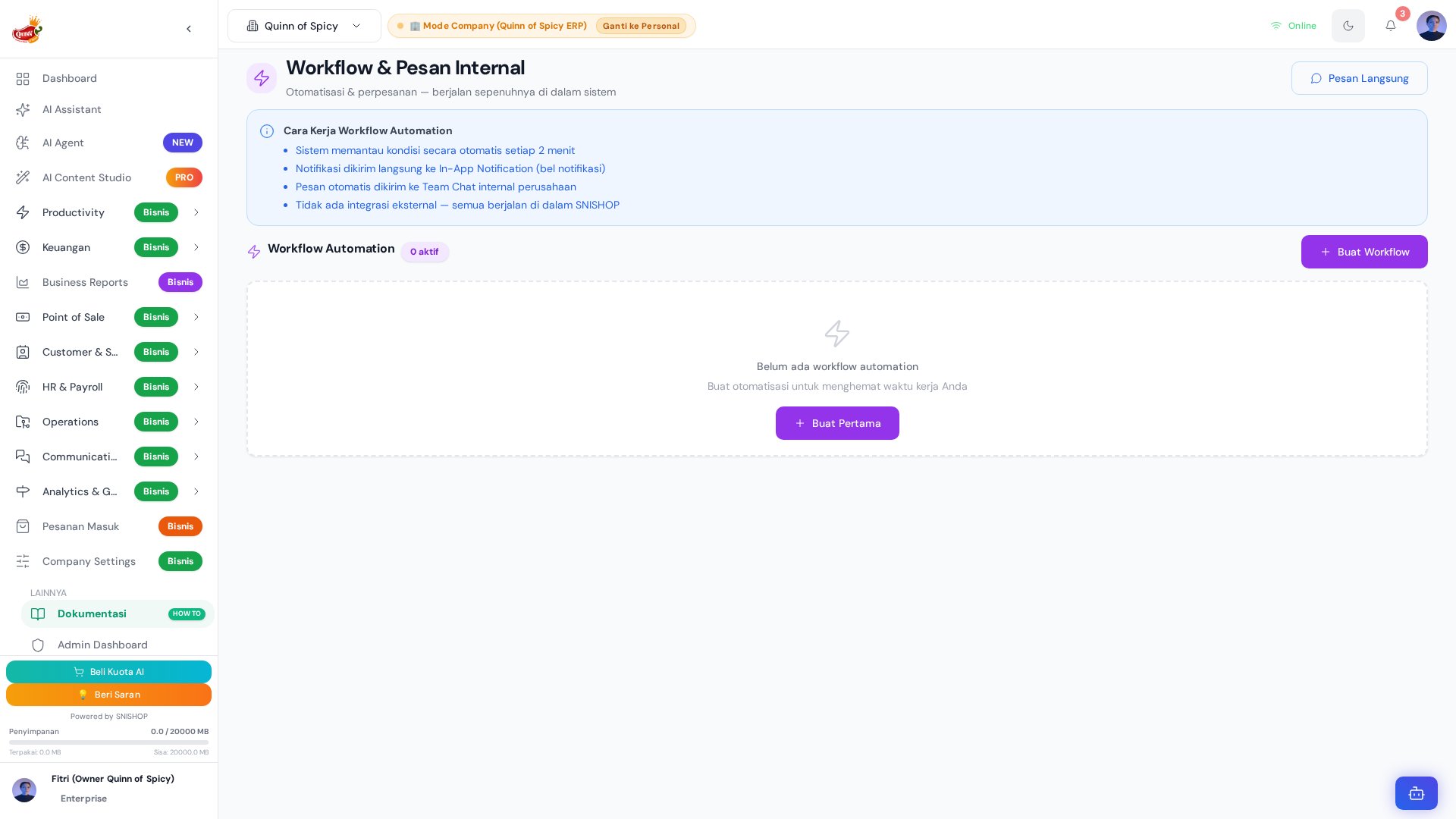
Automation.jsx (105 baris) dengan engine utama di WorkflowAutomationManager.jsx (427 baris) dan WorkflowEngine.jsx yang berjalan di background.
Sistem ini mendukung 12 jenis trigger dari berbagai modul (task, invoice, stock, KPI, leave request) dan 7 jenis action termasuk integrasi ke Google Sheets, Slack, dan Discord.
Arsitektur Komponen
Entity WorkflowAutomation
12 Trigger Types
Trigger Conditions
7 Action Types
Recipient Options
Workflow Engine
Background Polling
Engine berjalan di background dan mengevaluasi semua workflow aktif setiap 2 menit.Multi-Action Execution
Satu workflow bisa memiliki beberapa action yang dijalankan berurutan saat trigger terpicu.Cross-Module Integration
Data Scoping
Workflow di-scope berdasarkan:company_id— workflow berlaku untuk seluruh perusahaanuser_id— workflow berlaku hanya untuk user tertentu (opsional)
DirectMessage Integration
Sistem juga menggunakan entityDirectMessage untuk internal messaging dengan polling setiap 30 detik untuk unread count.
Contoh Workflow
1. Reminder Deadline Task
2. Low Stock Alert
3. Invoice Overdue Notification
Cara Akses
Dari sidebar, klik menu Marketing > Automation.Flow Penggunaan
- Buka halaman Automation dari sidebar — lihat daftar workflow yang sudah ada
- Klik “Buat Workflow” untuk membuat automation baru
- Beri nama dan deskripsi workflow
- Pilih trigger type dari 12 opsi yang tersedia
- Atur trigger conditions jika diperlukan (misal:
days_before: 3) - Tambahkan satu atau lebih actions yang harus dijalankan
- Untuk action eksternal (Google Sheets, Slack, Discord), isi connection details
- Aktifkan workflow dengan toggle Active
- Monitor
trigger_countuntuk melihat berapa kali workflow sudah berjalan - Review dan optimasi workflow secara berkala berdasarkan hasil
Tips
- Mulai dari workflow sederhana (1 trigger + 1 action) sebelum membuat yang kompleks
- Test workflow dengan skenario berbeda sebelum mengaktifkannya — pastikan trigger terpicu pada kondisi yang tepat
- Gunakan
task_due_approachingdengandays_before: 1untuk reminder H-1 deadline - Kombinasikan
low_stocktrigger dengansend_notificationke admin untuk restock alert - Review
trigger_countsecara berkala — workflow yang tidak pernah trigger mungkin perlu di-adjust condition-nya - Dokumentasikan setiap workflow dengan deskripsi yang jelas agar tim lain bisa memahami tujuannya
- Jangan membuat terlalu banyak workflow untuk trigger yang sama — bisa terjadi duplikasi notifikasi
Entity Relationship Diagram
Entity Schema Tables
WorkflowAutomation
Automation
Customer
Notification
EmailCampaign
NewsletterSubscriber
CustomerLoyaltyLedger
CustomerMembership
ChatChannel
Discount
Voucher
Referral
StockAlert
SalesPipeline
Siklus Hidup Automation Rule
Sequence Diagrams
1. Alur Trigger Rule
2. Alur Eksekusi Kampanye Email
3. Alur Customer Journey (Loyalty & Membership)
4. Alur Pipeline Sales & Lead Automation
Referensi Enum
WorkflowAutomation — trigger_type
WorkflowAutomation — actions[].action_type
Automation — trigger_type
Automation — action_type
Customer — customer_type
Customer — status
Customer — last_contact_method
Customer — payment_terms
Customer — preferences.preferred_contact
Notification — type
Notification — priority
EmailCampaign — status
NewsletterSubscriber — subscribed_from
CustomerLoyaltyLedger — event_type
CustomerLoyaltyLedger — scheme_type
CustomerMembership — scheme_type
CustomerMembership — reward_type
ChatChannel — channel_type
Discount — discount_type
Discount — applies_to
Voucher — discount_type
Voucher — applicable_plans[]
Referral — status
StockAlert — alert_type
StockAlert — severity
StockAlert — status
SalesPipeline — pipeline_stage
SalesPipeline — source_lead
SalesPipeline — interaction_history[].interaction_type
RBAC Permission Matrix
Berikut adalah matriks permission berbasis role (Role-Based Access Control) untuk setiap entitas yang terlibat dalam sistem Automation. Permission ditentukan berdasarkan kombinasiUser.role, WorkspaceMember.role, dan admin_type/admin_tier.